


Today, one of the biggest recruiting challenges is the ongoing skill shortage and the growing competition for top talent. And this is exactly where traditional sourcing methods start to fall short.
Most recruiters are still sourcing based on profiles, resumes, job titles, and keyword matches. But the best ones have already shifted to sourcing based on proof of work. Why? Because profiles only tell you what a candidate claims to know, not what they can actually do.
This is where platforms like GitHub give recruiters a real advantage.
GitHub flips the sourcing model. It gives you access to a massive pool of passive developer talent, people who aren’t actively applying but are constantly building.
GitHub also allows you to evaluate candidates through their actual work, repositories, and contributions, giving you a much clearer and more accurate picture of their skills.
In this blog, learn how to start sourcing top candidates from GitHub and lock in high-quality talent more effectively.
Why does GitHub matter for hiring efficiency?
There are over 180+ million active GitHub developers, and that number is always growing. This means that there’s a large pool of potential candidates to choose from.

GitHub user profiles include information about the candidate's skills, experience, and projects accomplished. You can also see their contributions to other repositories and their interactions with other users.
This information can help you quickly and easily assess whether a candidate is a good fit for your role.
GitHub gives recruiters something traditional hiring channels can’t, direct visibility into a candidate’s actual work. Here’s where the real advantage lies:
- Proof of work (real code, not claims)
- Evaluate actual skill depth
- Identify high-intent, passionate developers
- Access passive talent pool
- See real projects and contributions
- Understand collaboration and coding style
- Reduce hiring risk
- Improve quality of hire
- Faster, more confident screening decisions
Here are some facts that support GitHub’s surge in popularity over the years.
- More than 36 million new developers joined GitHub in just one year, with over 1 developer joining every second on average.
- As of June 2024, GitHub has generated more than 7.32% of the referral traffic to LinkedIn, making it the third leading traffic source to LinkedIn worldwide in 2024.
- Over 90% of Fortune 100 companies use GitHub as a central platform for building software, collaborating across global teams, managing DevOps workflows, and contributing to open source ecosystems.
Before You Start: Set Yourself Up for Effective Sourcing
Create a candidate persona (know what you’re looking for)
Before searching, define your ideal candidate profile.
This should include key parameters like location, education (if relevant), programming languages, frameworks, and specific skills required for the role.
This clarity helps you avoid vague searches and ensures you evaluate candidates against consistent criteria instead of guessing as you go.
Set up a credible recruiter profile (avoid looking like spam)
This is a commonly missed step. Developers on GitHub are highly cautious about unsolicited outreach.
If your profile looks incomplete or anonymous, your messages are likely to be ignored.
Make sure your recruiter profile includes:
- A real profile photo
- Your full name and company
- A short, clear bio explaining why you're on GitHub (e.g., hiring for engineering roles)
This builds trust and significantly improves your response rates.
How to start sourcing candidates on GitHub
There are a few different ways to source on GitHub. Here is a step-by-step guide describing effective methods for sourcing candidates.
Step 1: Go to GitHub & Log In
Start by opening your browser and heading to GitHub.
Log in using your credentials so you can access all search and filtering features.

Step 2: Use the GitHub search bar
At the top of the page, you’ll find the search box (with a magnifying glass icon). Click on it and type role-specific keywords.

Use keywords such as “HTML developer,” “React engineer,” or “data scientist.”

Step 3: Browse popular repositories
By default, GitHub shows repositories (projects).

Before jumping to profiles, spend time exploring repositories. This gives you insight into the kind of projects developers are building, the technologies they use, and how complex their work is.
Step 4: Switch to “Users” (Find Actual Candidates)
Once you’ve explored projects, click “Users” in the left sidebar. You’ll see individual profiles instead of projects.

Step 5: Apply filters like programming language to refine your search
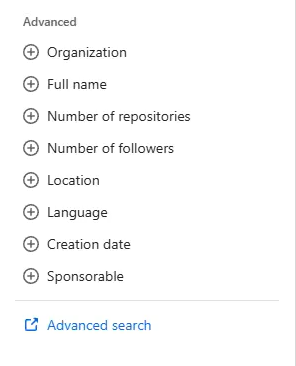
Use the filtering options in the sidebar, especially programming languages, to narrow down your results.

For example, if you’re hiring for a frontend role, filtering by JavaScript or HTML ensures you’re only looking at relevant candidates.
You can also use other advanced filters to further narrow your search.
Step 6: Open profiles to evaluate, qualify, and find contact details
Click on a candidate’s profile to review their contribution activity, repositories, and pinned projects.
Many profiles also include portfolio links or platforms like LinkedIn for outreach.
Common Challenges Recruiters Face on GitHub
1. High volume + low signal makes qualification difficult
GitHub has a massive pool of developers, but not all profiles are relevant or high-quality.
Unlike resumes or LinkedIn profiles, GitHub profiles vary widely in structure and detail. Recruiters must interpret repositories, contributions, and activity manually, which makes comparison across candidates time-consuming and inconsistent.
2. Difficulty in validating skill relevance and depth
While GitHub shows real work, it still requires effort to assess whether the code, projects, or contributions are relevant to the role. Candidates may contribute to projects in ways that don’t fully reflect their actual expertise, making qualification time-consuming.
3. Limited contact information slows down outreach
Many developers don’t publicly share emails or contact details on GitHub. This forces recruiters to rely on cross-platform searches or additional tools, adding friction and delaying the outreach process.
4. High competition for skilled and passive candidates
Most strong developers on GitHub are passive and already employed. At the same time, they are frequently approached by multiple recruiters, making it harder to capture attention and requiring highly personalized, relevant outreach.
How to find, evaluate, and convert high-quality GitHub talent
1. Advanced sourcing tactics most recruiters miss
To find high-quality candidates on GitHub, you need more targeted approaches.
- Break down your search instead of overloading queries
Instead of searching everything at once (e.g., “Python machine learning San Francisco”), build your search in stages. Start with language + location, then layer skills like “machine learning.”
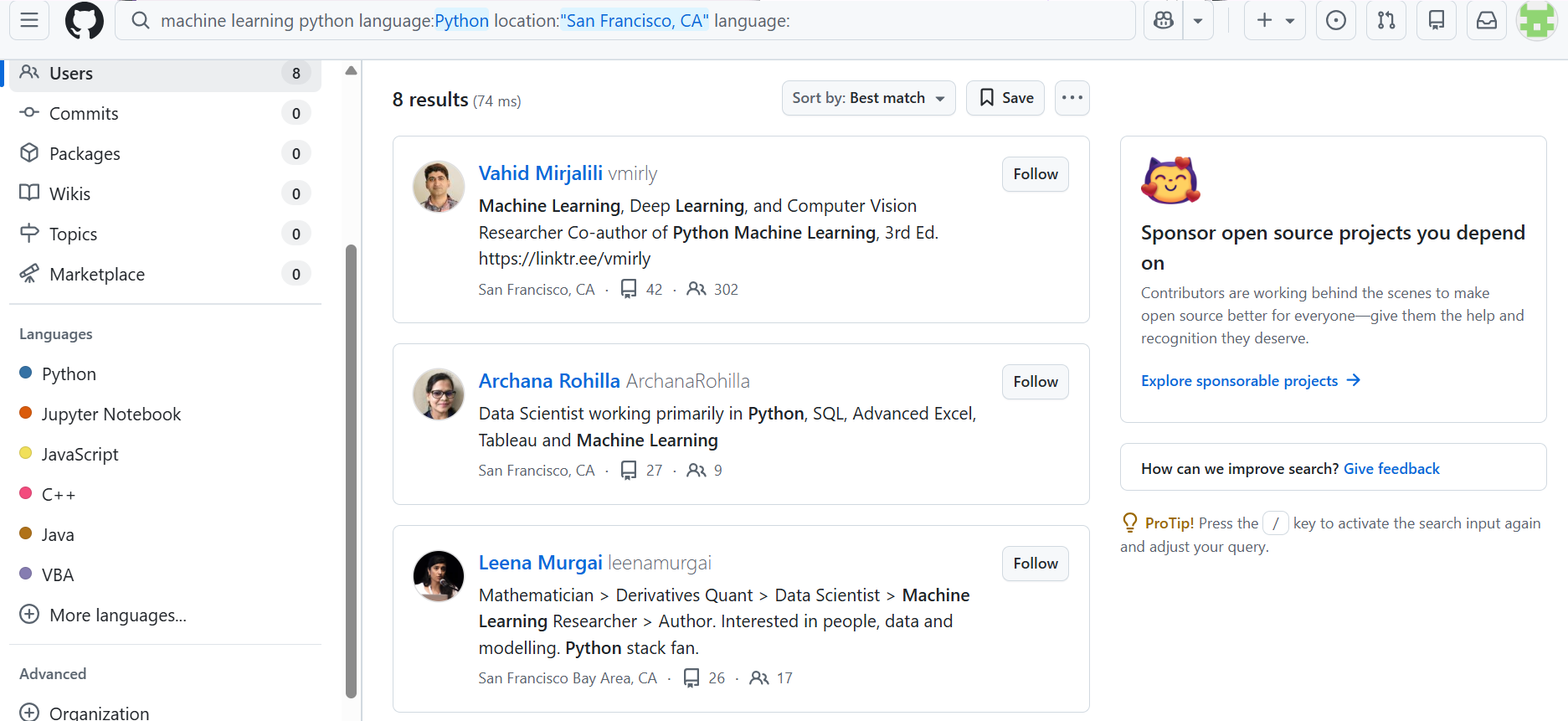
You can further add organizations, number of repositories, and number of followers.

- Use Boolean operators to build precise and scalable searches
Boolean operators like AND, OR, NOT help you combine or narrow search criteria for better results.
For example, instead of a broad search, use queries like python AND "machine learning" NOT junior or combine them with X-ray search like site:github.com "backend developer" AND "node.js".

This helps you target specific skill combinations.
- Structure searches for advanced results
Break searches into layers (language → skill → location)
Use GitHub-specific qualifiers like:
- language:python
- location:India
- followers:>50

2. Evaluate GitHub profiles based on real work signals
When you open a GitHub profile, don’t just skim it. GitHub is not structured like a resume, so you need to actively interpret what you see.
Focus on these key signals:
- Repositories → What have they built?
Look at the projects they’ve worked on. Check if they are relevant to your role and whether they reflect real-world work or just basic/demo projects.

Go beyond profile titles, check repositories to see what candidates have actually built, and review contributions to other projects. This gives a clearer picture of real-world experience and technical depth.
Go deeper into repositories and check:
- Clean, structured commit messages
- Evidence of testing
- Contributions across multiple projects
These are strong indicators of professional-level engineering practices.

- Stars → Is their work valued?
Stars act like social proof. Projects with more stars are usually more useful, impactful, or widely recognized.
GitHub’s star system acts like social proof. Developers with higher stars on their repositories often have more impactful or widely used projects, making it a quick way to identify stronger candidates.
50–100+ stars indicate a good profile. Treat stars as a supporting signal and prioritize repository quality.

- Commit history → Are they consistent?
Regular commits indicate an active and engaged developer. Long gaps may suggest inactivity or outdated skills.

- Forks → Are others using their code?
Forks show that other developers are building on their work, which signals practical value and usability.
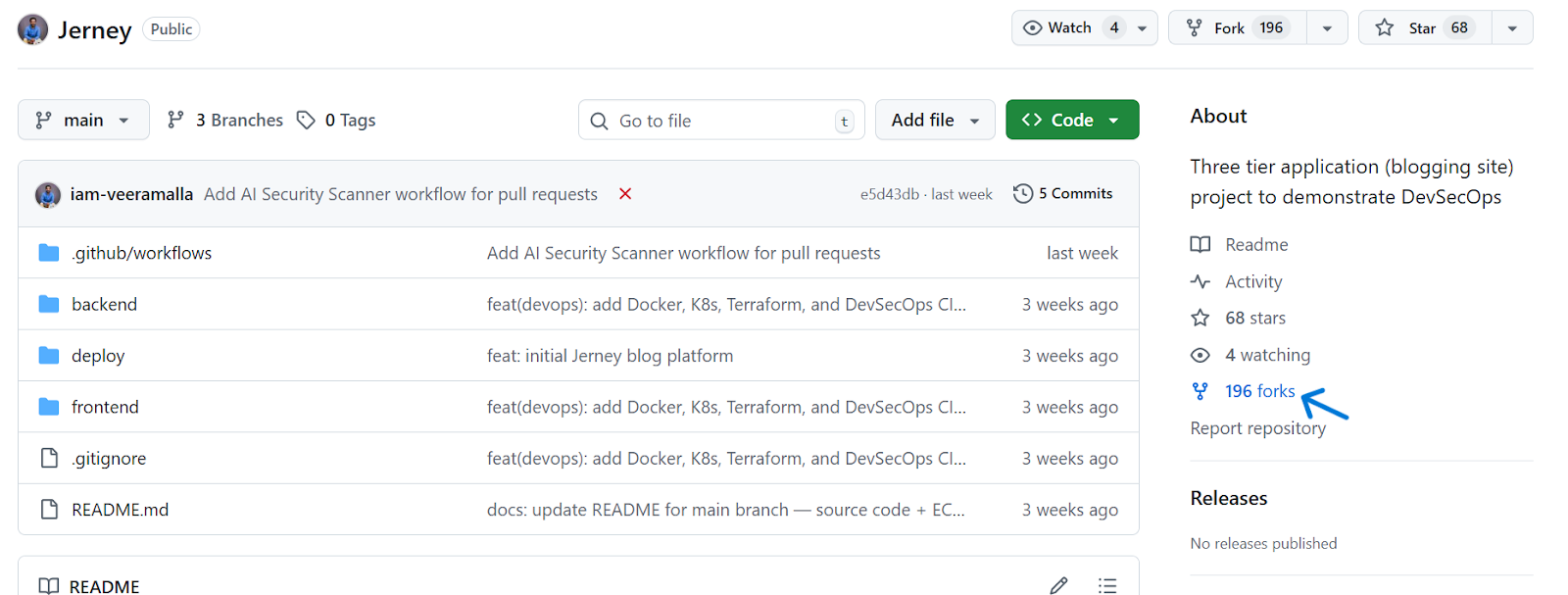
- Contribution graph → Are they actively coding?
The activity calendar helps you quickly assess consistency and recent activity over time.

👉Pro tip: Use shortcuts like Ctrl+F to scan profiles or repositories for specific keywords (e.g., “machine learning”). This helps you quickly validate whether a candidate truly matches the role.
3. How to qualify candidates quickly (decision-making framework)
To avoid overthinking every profile, use a simple qualification filter:
- Must-have vs nice-to-have skills
Clearly define what is non-negotiable for the role. This helps you quickly eliminate candidates who don’t meet core requirements.
- Project relevance to your role
Prioritize candidates whose work directly aligns with your role, instead of getting distracted by impressive but irrelevant projects.
- Depth vs breadth of contributions
Look for meaningful involvement, either strong expertise in one area or consistent contributions across projects, rather than shallow activity.
4. How to reach out to candidates on GitHub (without sounding like spam)
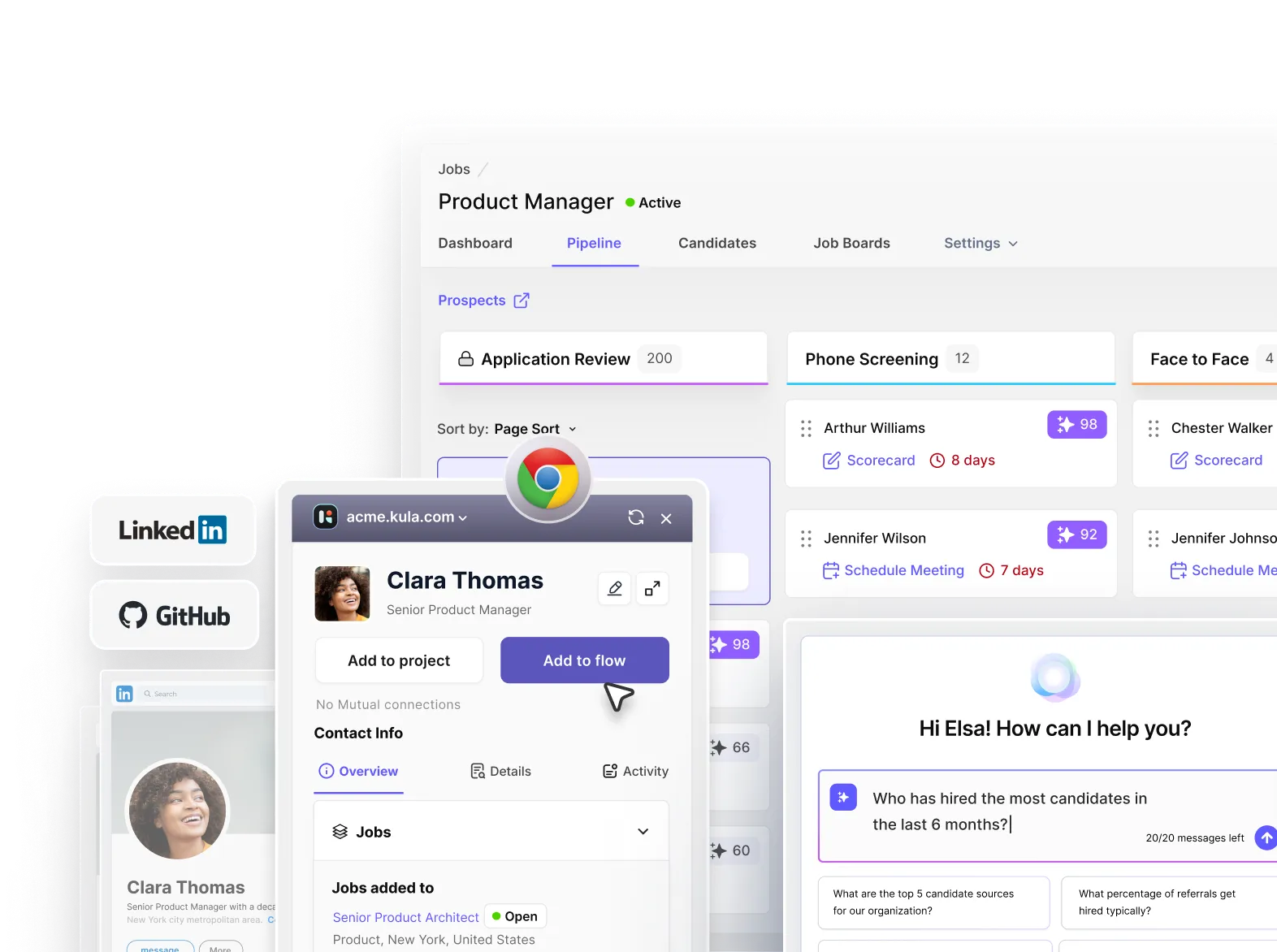
Use this Chrome extension to engage ideal candidates from GitHub. It automatically finds their contact details (enrichment) and lets you reach out directly via email instead of relying on platform messages.
Once you have the right contact channel, how you approach candidates makes all the difference:
- Reference their work (make it specific)
Mention a repository, project, or contribution you’ve actually reviewed to show genuine interest.
- Keep it short and relevant
Avoid long, generic messages, get to the point and respect their time.
- Explain why you’re reaching out to them
Connect their work to your role so they understand why they’re a strong fit.
- Offer value, not just a job pitch
Highlight interesting problems, tech stack, or growth opportunities, not just “we’re hiring.”
- Keep it low-pressure
Position your message as a conversation starter, not a hard sell.
Here are some outreach message examples for you to try:
👉Short and personalized (best for cold outreach)
Hi [First Name],
Came across your work on the [project/repo name], especially [specific detail].
I’m hiring for a team working on a similar stack, and your experience stood out.
Open to a quick conversation?
— [Your Name]
👉Context + value-driven
Hi [First Name],
I was going through your GitHub and really liked your work on [project name], particularly how you handled [specific feature/problem].
We’re building [product/context] used by [X users/companies], and it involves similar challenges. Thought this might be interesting for you.
Happy to share more if you’re open to it.
— [Your Name]
👉Slightly detailed (for high-intent candidates)
Hi [First Name],
I came across your GitHub profile and was impressed by your contributions to [project/repo].
At [Company], we’re working on [what you’re building + scale/impact], and we’re looking for someone who can contribute to similar challenges in [specific area].
Given your experience with [relevant skill], it felt like a strong match.
Would you be open to a quick chat?
— [Your Name]
5. Cross-platform mapping: how to identify candidates beyond GitHub
to map a candidate’s full professional identity across platforms:
- Start with bio and README: Use these to identify clues like personal websites, usernames, or linked profiles. Some profiles already have attached cross-platform links.

- Search for the same username across platforms: Many developers reuse handles. Look them up on LinkedIn or Twitter/X. Match signals like project names, profile photos, or bios to ensure you’ve found the right person.
- Use tools for faster mapping: Few ATS tools can automatically connect profiles across platforms and enrich candidate data.
6. Employer branding on GitHub
Instead of only reaching out to candidates, build a presence that makes developers discover your company organically.
- Use GitHub Pages to showcase your engineering work
Create a dedicated GitHub page to highlight your projects, tech stack, and real-world problems your team is solving.
- Showcase open-source contributions
Actively contributing to open source builds credibility and signals strong engineering culture.
- Highlight your developers' experience and culture
Share how your team works, what you’re building, and the kind of challenges engineers will solve.
- Make it easy to explore and engage
Link repositories, documentation, and contribution guidelines so developers can interact with your work.
How to automate sourcing on GitHub?
Step 1: Sign in to your Kula account and install the Kula Chrome extension.
Step 2: Identify candidates on GitHub by adding keywords to the search bar and adding locations and advanced filters to reach the most relevant candidates.
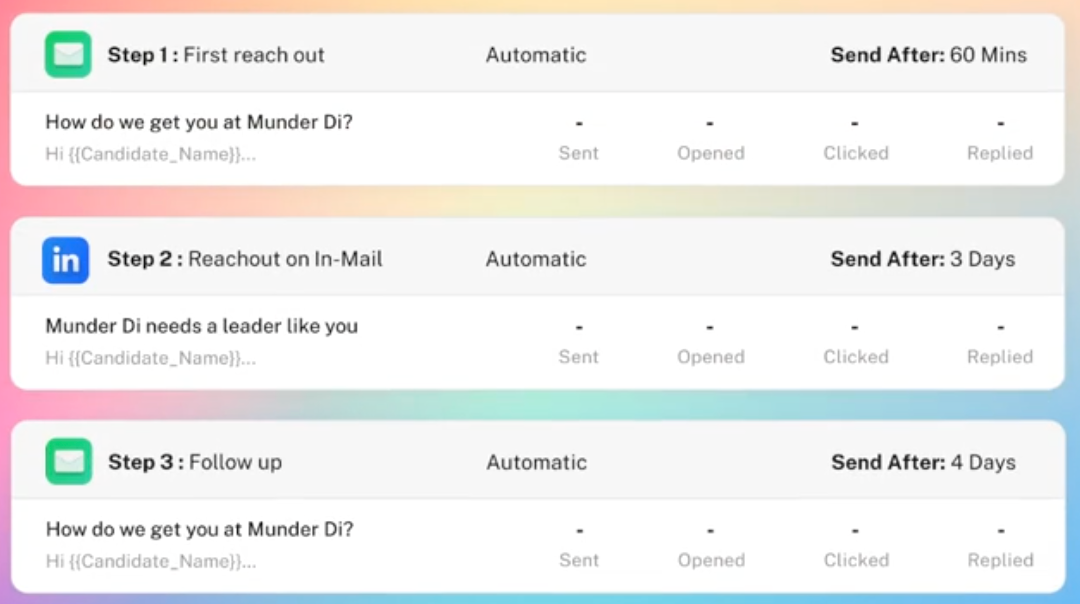
Step 3: One-click sourcing of diverse candidates with the Kula Chrome Extension. Select the profile, use enrichment to extract the email address, and add a candidate to the Kula automated flow.
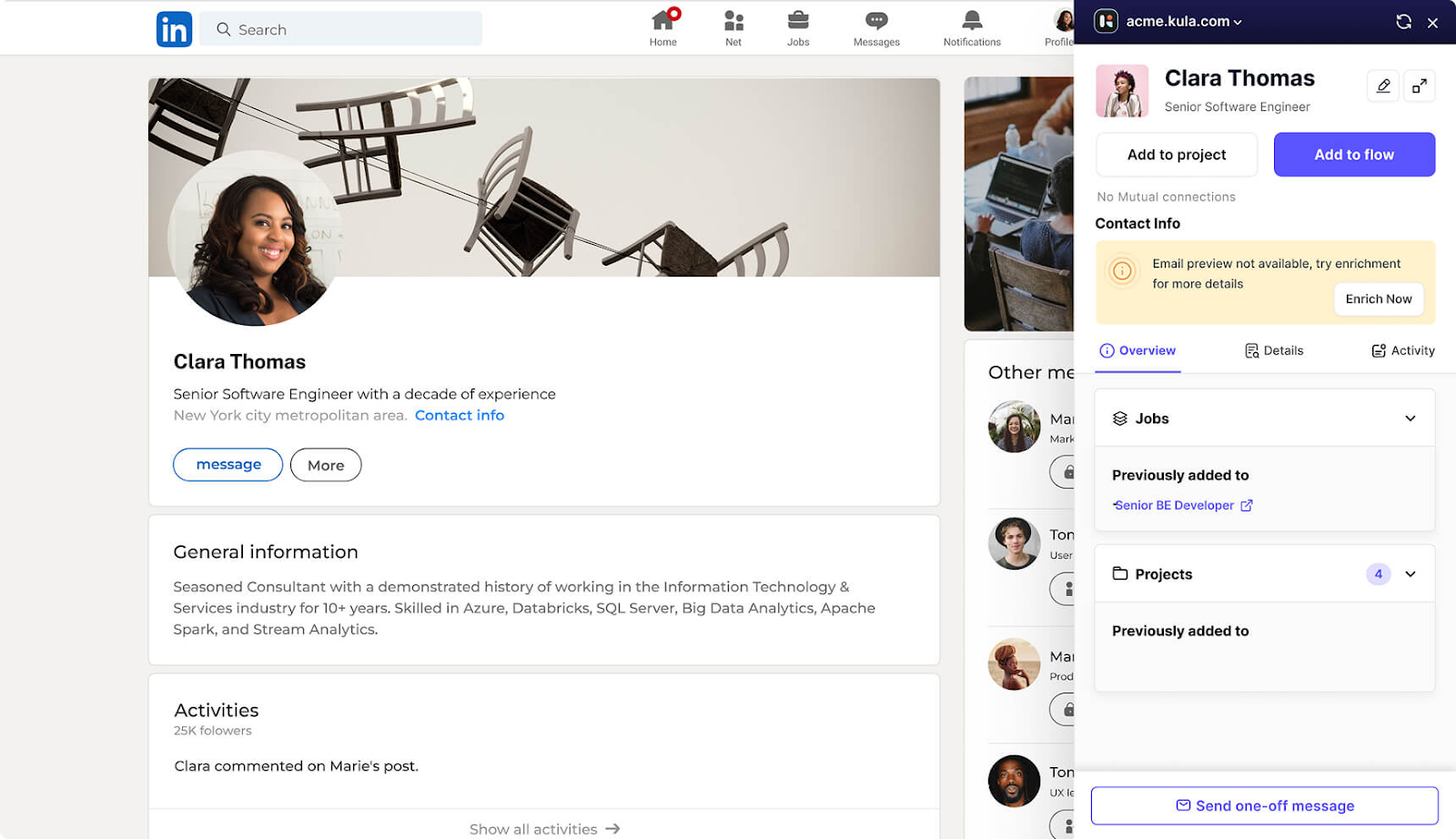
Step 4: Set up automated flows for multichannel candidate outreach. Use Kula Gen AI to set up personalized automated communications (emails, LinkedIn InMails, and DMs) to nurture candidates.