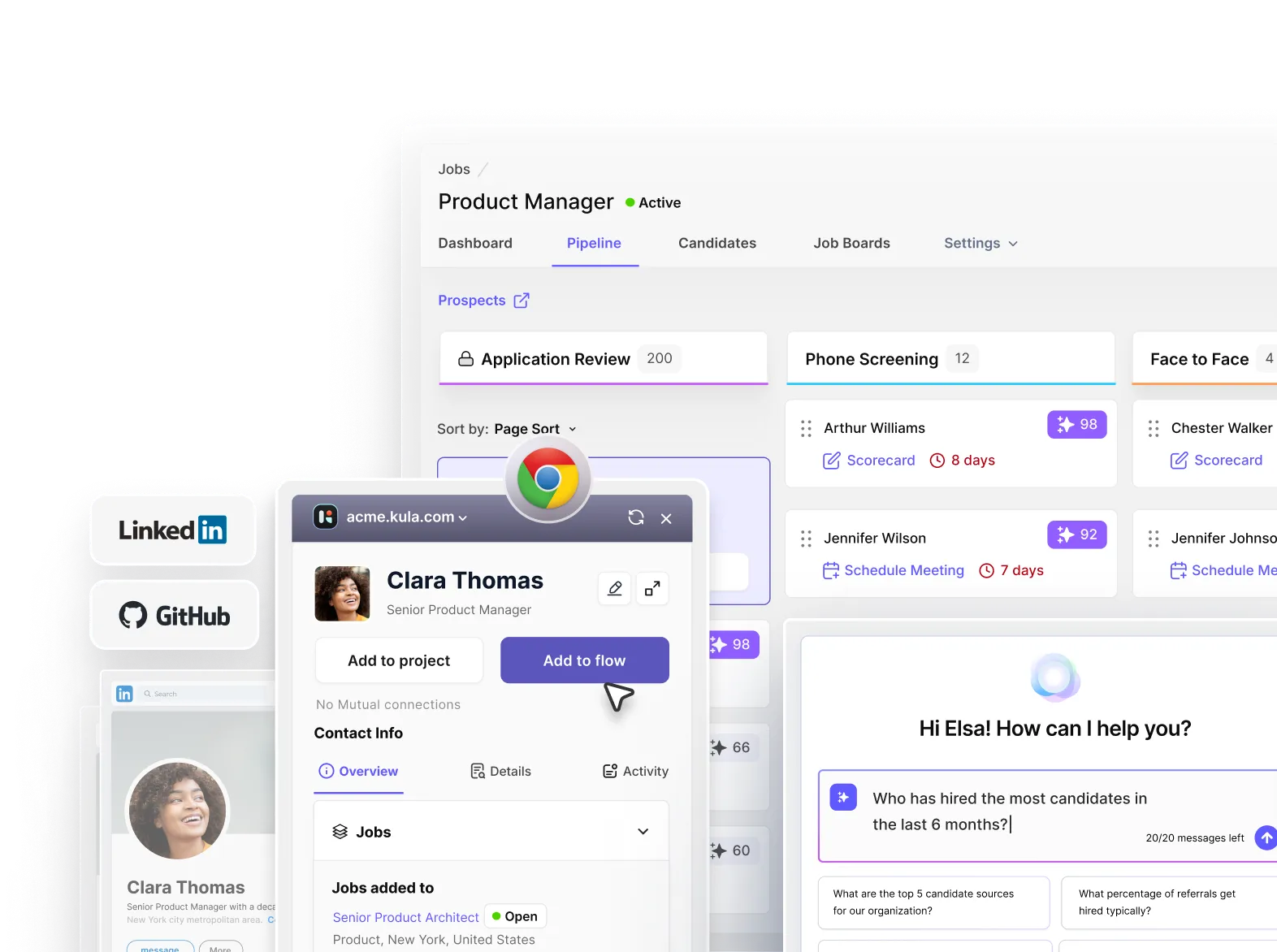





A single job posting can now attract 200–300+ applications on average, and in some cases, far more. Most of those applications aren’t relevant, but they still need to be reviewed.
And managing this process with spreadsheets or disconnected tools doesn’t scale.
That’s why an applicant tracking system has become a standard for most recruiting teams. According to Select Software Reviews:
- An effective ATS can reduce hiring cycles by up to 60%
- Around 70% of large companies now use an ATS
- 62% of teams report higher-quality candidates compared to traditional inbound processes
At this point, an ATS isn’t just a productivity tool. It’s the system that keeps hiring structured, trackable, and consistent as teams scale.
What is an applicant tracking system
An applicant tracking system (ATS) is software used to manage candidates and hiring workflows within a single system.
It brings together candidate applications, hiring data, interview processes, and team feedback into a structured pipeline, so the recruiting process doesn’t depend on scattered tools or manual coordination.
In practice, the ATS becomes a centralized system where hiring actually happens.
What an ATS does
Most explanations about applicant tracking systems stop at “it stores resumes.” But that’s only a small part of what an ATS actually does.
An ATS actually brings structure and repeatability to hiring.
At a deeper level, applicant tracking systems do three things simultaneously: organize information, standardize processes, and enable hiring decisions based on collected data.
Here’s how that plays out:
- Centralizes candidate data: Every resume, interaction, evaluation, and status update lives in one place. This creates a single source of truth instead of fragmented records across inboxes and docs.
- Imposes structure on hiring workflows: Candidates move through clearly defined stages instead of informal, inconsistent processes that vary by role or hiring manager.
- Creates a shared working layer for hiring teams: Recruiters, hiring managers, and interviewers operate inside the same system, leaving feedback, reviewing profiles, and aligning on decisions without back-and-forth coordination.
- Reduces operational friction: Tasks like interview scheduling, sending updates, or progressing candidates don’t require manual follow-ups at every step. Usually an ATS automates these stages.
- Introduces visibility and accountability: Teams can see where candidates are getting stuck, how long stages take, and which sources are performing. This helps ensure hiring is more measurable, not based on guesswork.
Without this layer, hiring tends to become reactive and inconsistent. With a high-quality ATS, teams can run hiring as a structured, repeatable process.
Evolution of an ATS
The evolution of ATS platforms mirrors how hiring itself has changed. Applicant tracking systems, along with the hiring process itself went from localized, manual processes to globally distributed, high-volume systems.
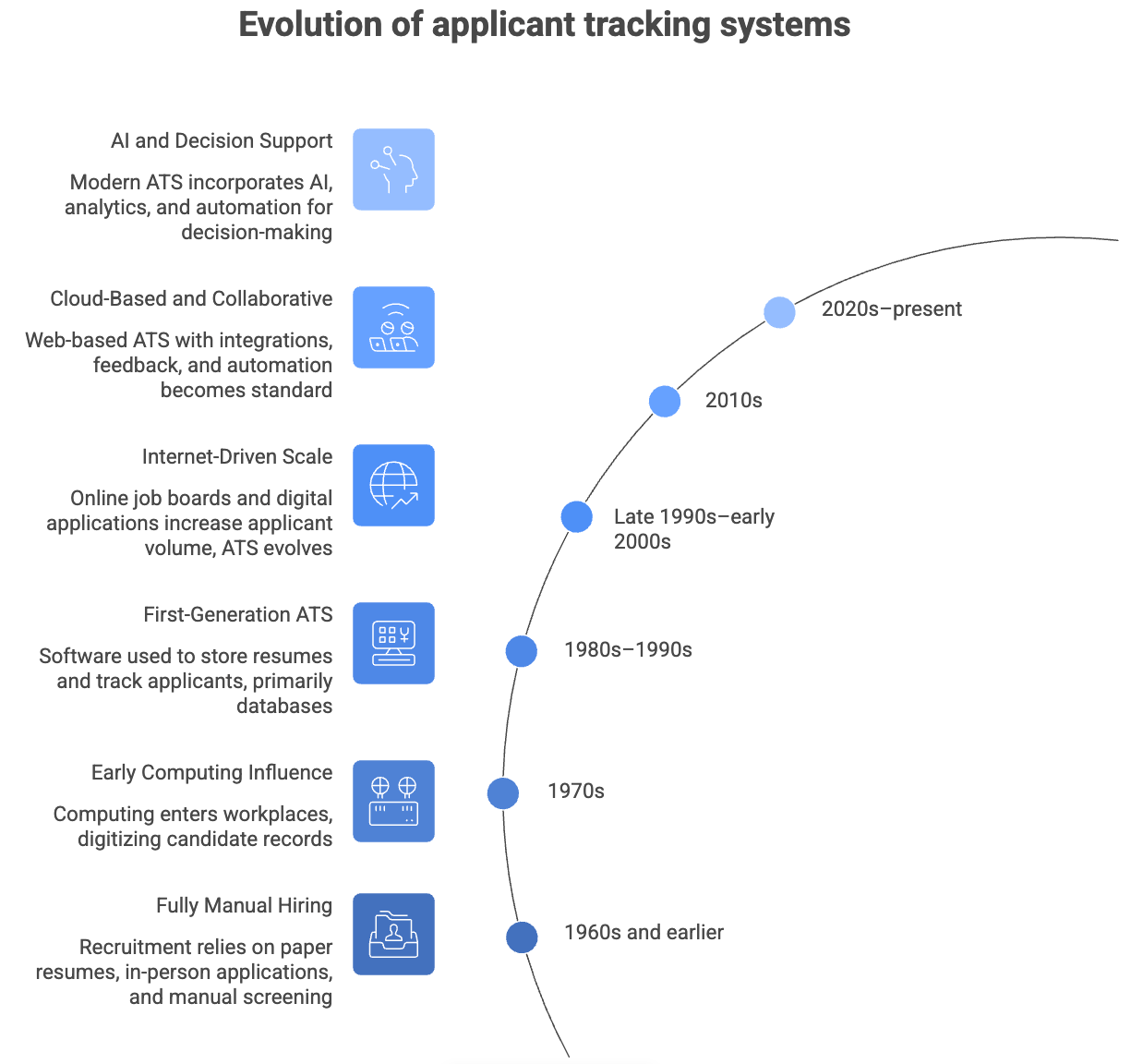
Each phase wasn’t just about better technology. It reflected a shift in how companies approached scale, speed, and decision-making. Here’s what’s changed over the years:
- 1960s and earlier — Fully manual hiring: Recruitment relied on paper resumes, in-person applications, and manual screening. Hiring was local, slower, and limited in volume.
- 1970s — Early computing influence: As computing entered workplaces, early systems began to digitize candidate records. These were not ATS platforms as we know them, but they laid the groundwork for storing and retrieving candidate data.
- 1980s–1990s — First-generation ATS platforms: Organizations began using software to store resumes and track applicants. These systems were primarily databases with limited workflow capabilities.
- Late 1990s–early 2000s — Internet-driven scale: Online job boards and digital applications dramatically increased applicant volume. ATS platforms evolved to handle larger pipelines and more structured tracking.
- 2010s — Cloud-based and collaborative systems: Web-based ATS platforms expanded access to companies of all sizes. Features like integrations, collaborative feedback, and automation became standard, enabling distributed hiring teams.
- 2020s–present — AI and decision support: Modern ATS platforms incorporate automation, analytics, and AI-assisted capabilities. The focus has shifted from managing candidates to improving decision-making, efficiency, and candidate experience at scale.
The trajectory for recruiting technology went from record-keeping to workflow management, to finally becoming decision support systems.
ATS vs. other tools
A common point of confusion is where the ATS fits within the broader recruiting stack and how it compares to other hiring tools like CRMs or an HRIS.
While multiple tools support hiring, they serve different roles:

The distinction becomes clearer when you look at how hiring actually runs:
- Job boards and sourcing tools bring candidates in
- CRM systems engage and nurture candidates over time
- The ATS is where candidates are evaluated, progressed, and hired
This is why the ATS typically becomes the central system in the hiring stack. Everything else either feeds into it or extends it.
Who uses an applicant tracking system?
Hiring is inherently cross-functional, and the ATS reflects that. The hiring process is usually not owned by a single role. It's a shared infrastructure that involves multiple stakeholders. That’s why a great ATS should help ensure smooth collaboration between:
- Recruiters who use it to manage pipelines, review applications, and drive the process forward.
- Hiring managers who use it to evaluate candidates and provide structured feedback.
- HR and people operations teams who rely on it for compliance, reporting, and auditability.
- Leadership teams who use it to understand hiring velocity, efficiency, and outcomes.
- Candidates who interact with it when applying, scheduling interviews, and receiving updates.
Because all of these stakeholders interact with the same system, the ATS becomes the layer that keeps hiring aligned, visible, and consistent.
How an applicant tracking system works (step-by-step)
At a high level, an ATS turns hiring into a structured pipeline. But in practice, it’s coordinating three things at once:
- Candidate data
- Hiring workflows
- Team decisions
The steps look linear, but in reality, they’re constantly interacting. That’s what makes the ATS valuable—it keeps everything connected.
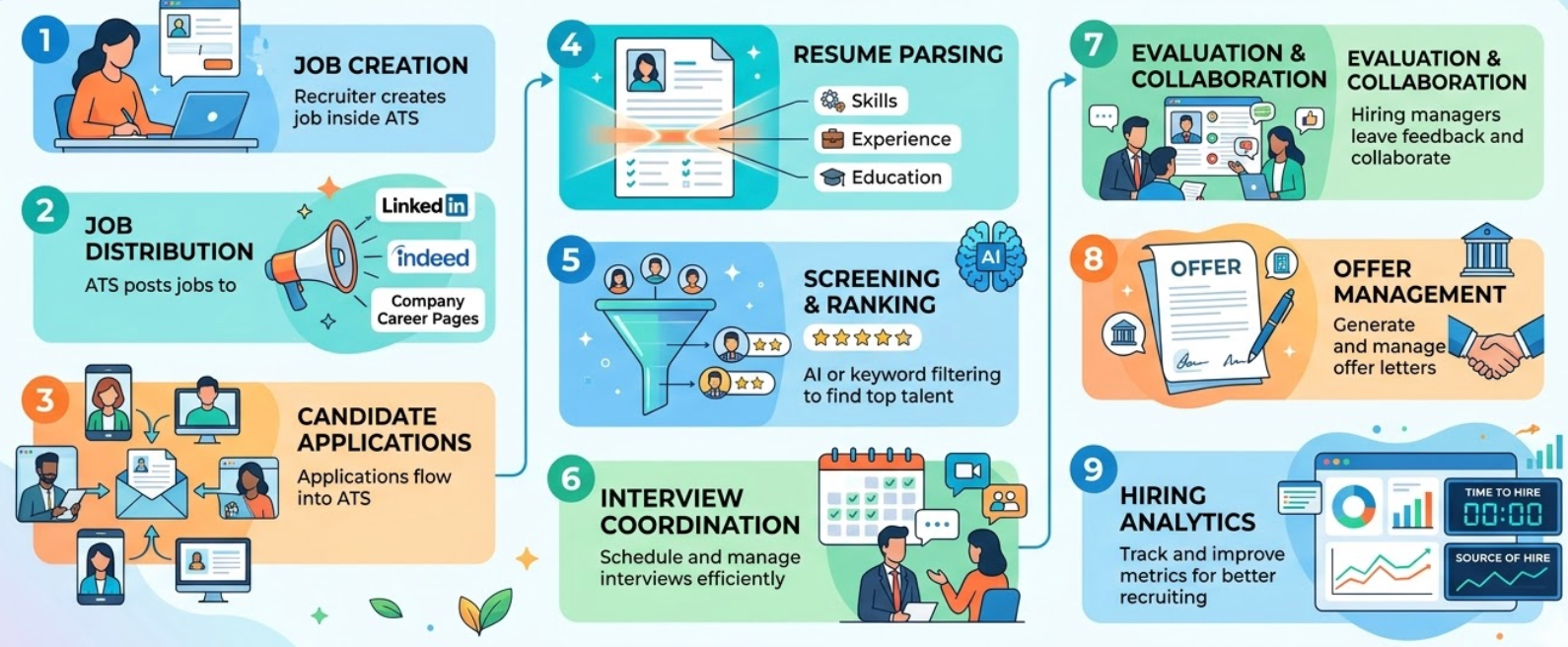
Step 1: Job creation
Hiring starts by defining the role inside the ATS. This step is often underestimated, but it sets the foundation for everything that follows.
A job in an ATS typically includes:
- Role requirements and success criteria
- Hiring stages (e.g., recruiter screen → technical → panel → final)
- Interview structure and scorecards
- Stakeholders involved in the process
Hiring teams will usually create a job opening in an ATS, which will act like a folder for all things related to this open role.
This is where teams standardize how a role will be evaluated.
If this step is vague or inconsistent, the rest of the pipeline tends to break—candidates are assessed differently, feedback is unstructured, and decisions become subjective.
Step 2: Job distribution
Once the role is approved, the ATS distributes it across channels. Instead of manually posting jobs, an ATS can automatically push listings to platforms like:
- Indeed
- Company career pages
- Other job boards and sourcing platforms
But distribution isn’t just about reach. Today, you’ll find some applicant tracking systems that also track:
- Where candidates are coming from
- Which channels convert into interviews and hires
This becomes important later when teams try to understand which sources actually work, not just which generate volume.
Step 3: Candidate applications
As applications come in, the ATS creates a structured profile for each candidate. This is where fragmentation usually disappears.
Instead of relying on:
- Resumes in inboxes
- Notes in docs
- Communication scattered across tools
Everything is tied to a single candidate record with the ATS which includes:
- Resume + parsed data
- Application source
- Communication history (emails, LinkedIn DMs, referrals, etc)
- Candidate stage in the pipeline
At scale, this is what prevents candidates from slipping through the cracks or being duplicated across systems.
Step 4: Resume parsing
Once candidates enter the system, the ATS converts unstructured resumes into structured data. The process of resume parsing extracts:
- Skills
- Experience
- Education
- Keywords and role-relevant signals
This is what makes large pipelines usable.
Without parsing, every resume has to be manually interpreted. But with an ATS, recruiters can filter, search, and segment candidates instantly.
A lot of resume parsing features in applicant tracking systems rely on keyword criteria related to the role.
That said, parsing isn’t perfect. Poor formatting or unconventional resumes can still create gaps, which is why most teams combine automated parsing with manual review.
Step 5: Screening and ranking
This is where the ATS starts influencing decision-making. Candidates are filtered or prioritized based on predefined criteria:
- Required skills or experience
- Role-specific qualifications
- Keyword matches
- AI-based scoring models (in more advanced systems)
The goal isn’t to “decide” who gets hired. It’s to reduce the initial noise so recruiters can focus on the most relevant candidates first.
This step becomes especially critical in high-volume roles, where reviewing every application manually isn’t realistic.
It’s also where many teams run into issues like overly rigid filters can exclude strong candidates, while weak criteria can flood the pipeline with low-quality profiles.
Step 6: Interview coordination
Once candidates move forward, coordination becomes the bottleneck. An ATS handles:
- Interviewer availability
- Calendar scheduling
- Candidate communication
- Rescheduling and updates
At smaller volumes, this can be managed manually.
At scale, it quickly becomes one of the most time-consuming parts of hiring. This is why most ATS platforms invest heavily in interview scheduling automation. Not because it’s complex, but because it’s repetitive and high-friction.
Plus, it makes it easier for both candidates and hiring managers to schedule slots without constant back and forth for confirming availability.
Step 7: Evaluation and collaboration
After interviews, feedback from hiring managers is captured inside the ATS. This is where hiring shifts from execution to decision-making.
Teams can:
- Submit structured scorecards
- Leave written feedback
- Compare candidates across stages
Today, you’ll also find a lot of applicant tracking systems like Kula that integrate automated interview notetaking that is recorded within the platform itself. This way you don’t need to rely on memory or external interview notes.
Instead of feedback being scattered across Slack threads or emails, everything is tied to the candidate and visible to the hiring team.
This reduces bias, improves alignment, and speeds up decisions, especially when multiple stakeholders are involved.
Step 8: Offer management
Once a candidate is selected, the ATS moves into the closing phase. This includes:
- Generating offer letters
- Managing approval workflows
- Tracking offer status and acceptance
At this stage, speed matters. Delays in approvals or communication often lead to candidate drop-offs. A structured system ensures that offers move quickly and don’t depend on manual follow-ups.
This is why the best applicant tracking systems allow automated communication between recruiters and candidates to reduce ghosting, and keep candidates in the loop.
Step 9: Hiring analytics
Every step in the ATS generates data. Over time, this data becomes one of the most valuable parts of the system. Surprisingly, most hiring teams just leave this data sitting in their ATSs, but it can be leveraged for future hiring as well.
For example, you can always circle back to a past candidate who applied to a role for a new opening in the future.
An ATS is also great for identifying bumps in the hiring process. For example, you can find key recruiting KPIs like:
- Time to hire
- Source of hire
- Stage-by-stage conversion rates
- Acceptance rates
- Time spent in each hiring stage
For example:
- Are candidates dropping off after the first interview?
- Are certain sources generating volume but not quality?
- Which roles consistently take longer to close?
This is where hiring shifts from reactive to measurable. According to Kula’s 2025 State of Recruiting report, 34% of teams are increasing investment in analytics and reporting, reflecting a growing focus on data-driven hiring decisions
While these steps are presented sequentially, in reality, they operate as a continuous system:
The ATS connects each of these stages so that:
- Data flows forward
- Decisions are traceable
- Workflows remain consistent
Types of applicant tracking systems
Not all ATS platforms are built for the same kind of hiring.
Depending on your company size, hiring complexity, and how much control you need over your workflow, you’ll need a specific type of ATS that meets your needs.
A small team hiring a few roles a month doesn’t need the same system as a company running global, multi-role hiring at scale.
That’s why choosing the right ATS depends less on features and more on your:
- Hiring volume
- Process complexity
- How much structure your team needs
Because at the end of the day, the ATS you choose shapes how your hiring process runs.
For starters, here are the types of ATS platforms you’ll come across:
1. Basic ATS (for small teams)
Basic ATS platforms are designed for companies with low hiring volume and simple workflows.
They focus on getting the fundamentals right:
- Posting jobs
- Collecting applications
- Tracking candidates through a basic pipeline
You won’t find deep customization, advanced analytics, or maybe heavy AI features here—and that’s intentional. The goal is to keep things lightweight and easy to use.
A basic ATS with a limited feature stack will work best for:
- Early-stage startups
- Small businesses hiring occasionally
- Teams without a dedicated recruiting function
Examples of basic ATS platforms:
- Zoho Recruit: Affordable and easy to set up, with solid core features for candidate tracking, resume parsing, and basic automation
- Lever: User-friendly interface with strong pipeline visibility and collaboration features, suitable for teams moving beyond spreadsheets
- Breezy HR: Simple, visual pipeline with built-in scheduling and communication tools, making it easy for small teams to manage hiring end-to-end
2. Mid-market ATS (for growing companies)
This is where most modern recruiting teams operate.
Mid-market ATS platforms are built for companies that are hiring consistently and need more structure, visibility, and collaboration.
Compared to basic applicant tracking systems, they offer:
- Customizable pipelines and workflows
- Structured interview processes and scorecards
- Integrations with sourcing, scheduling, and assessment tools
- Reporting on hiring performance
The focus here is on making hiring repeatable and scalable, without the overhead of enterprise systems.
Where they work best:
- Growth-stage startups
- Mid-sized companies with active hiring pipelines
- Teams scaling recruiting operations
Examples of mid-market ATS platforms:
- Greenhouse: Best for structured hiring, offering robust analytics and structured and data-driven hiring processes.
- Ashby: Favored by tech companies for its powerful analytics, automation, and customizable workflows.
- Workable: Known for excellent sourcing tools and ease of use, making it ideal for fast-paced, mid-market companies.
3. Enterprise ATS (for large organizations)
Enterprise ATS platforms are designed for companies with high hiring volume, complex org structures, and strict compliance requirements.
Along with the aspects found in a mid-market ATS, an enterprise level system will prioritize:
- Governance and approval workflows
- Global hiring support (multiple regions, languages, entities)
- Deep integrations with HR systems
- Advanced reporting and compliance tracking
They’re powerful, but often come with trade-offs like longer implementation cycles, higher costs, and less flexibility in day-to-day use.
Where they work best:
- Large enterprises and multinational organizations
- Companies with strict regulatory requirements
- Teams managing hiring across multiple regions and business units
Examples of enterprise level ATS platforms:
- iCIMS Talent Cloud: Ideal for global enterprises, featuring over 800+ integrations, robust compliance tools, and support for high-volume hiring.
- Workday: Works well for organizations already utilizing the Workday HCM ecosystem, providing seamless talent management and enterprise analytics.
- Taleo: Suited for organizations embedded in the Oracle ecosystem, offering advanced AI matching and comprehensive talent sourcing.
4. Recruitment CRM platforms (for outbound sourcing)
Recruitment CRM platforms aren’t ATSs in the traditional sense, but they’re often used alongside them. While an ATS manages inbound applicants, a CRM focuses on outbound recruiting activities like:
- Building talent pipelines
- Engaging passive candidates
- Running outreach campaigns
They’re especially useful for roles where strong candidates don’t actively apply.
That said, they don’t replace an ATS. Once a candidate enters a structured hiring process, the ATS takes over.
Where they work best:
- Teams doing proactive sourcing
- Companies hiring for hard-to-fill or niche roles
- Organizations building long-term talent pipelines
Examples of recruiting CRMs:
- HubSpot: Flexible CRM with strong automation and email sequencing, often adapted by recruiting teams for outreach and candidate nurturing,
- Beamery: Built specifically for talent teams, with robust pipeline management, segmentation, and long-term candidate engagement.
- Bullhorn: Designed for staffing and recruiting agencies, combining CRM capabilities with applicant tracking and client management.
- AI-native ATS (new generation)
AI-native ATS platforms represent the next shift in recruiting systems.
Instead of treating AI as an add-on, these systems are built with AI embedded across the workflow. This typically shows up in areas like:
- Candidate scoring and prioritization
- Automated screening and shortlisting
- Interview intelligence and feedback capture
- Conversational analytics and reporting
Traditional ATS platforms focus on tracking and organizing hiring. But AI-native recruiting systems aim to assist with decision-making and reduce manual effort.
This is becoming increasingly relevant as:
- Application volumes increase
- Recruiters are expected to do more with less
- Teams look for ways to improve both speed and quality of hire
- Hiring processes become more data-driven and correlated to business outcomes
This is where AI-native ATS platforms stand out not just for organizing workflows, but actively supporting decision-making across the hiring process.
Built as an AI-native ATS, Kula embeds artificial intelligence across the entire hiring workflow, not just screening. It uses AI in all core hiring functions like:
- AI scoring to rank candidates based on role-specific criteria
- AI-powered interview intelligence to capture and analyze feedback
- Conversational AI analytics to surface insights instantly, turning the ATS from a tracking system into a real-time decision-making engine.
Benefits of an ATS and why companies use an ATS
As application volume increases and processes involve more stakeholders, manual workflows create delays, inconsistencies, and poor candidate experiences. An ATS solves for this by standardizing how hiring is executed.
For employers, an ATS brings structure, efficiency, and visibility. And for candidates, it creates a faster, more predictable experience.
As hiring becomes more complex and data-driven, both sides increasingly depend on systems that can manage that complexity without breaking.
Employer benefits
1. Efficiency and automation
Hiring involves a lot of repetitive coordination—posting jobs, screening applications, scheduling interviews, sending updates.
According to GoodTime’s Hiring Insights report, recruiting teams spent 42% of their time scheduling interviews in 2023.
An ATS reduces this operational load by automating large parts of the workflow:
- Job distribution across multiple platforms
- Interview scheduling and calendar coordination
- Communication triggers based on candidate stage
This allows recruiters to spend less time on coordination and more time on evaluation.
2. Improved hiring quality
Without structure, screening is inconsistent and often biased toward speed rather than fit.
According to Kula’s 2025 State of Recruiting report 62.5% of talent leaders rank quality of hire as their #1 recruiting KPI, placing it above speed and cost-saving metrics.
Plus, 78% of recruiters say an ATS helps improve their quality of hire.
An ATS improves quality by:
- Standardizing evaluation criteria
- Enabling structured scorecard
- Surfacing relevant candidates through filtering or scoring
This becomes especially important in high-volume roles, where manually reviewing every application isn’t realistic.
3. Better collaboration and structured hiring
Hiring decisions rarely involve one person. An ATS creates a shared system where:
- Recruiters manage pipelines
- Hiring managers review candidates
- Interviewers submit feedback in a consistent format
This reduces back-and-forth, avoids misalignment, and ensures candidates are evaluated against the same criteria.
4. Compiance and auditability
As companies scale, hiring processes need to be documented and consistent. An ATS maintains:
- Complete candidate records
- Interview feedback and decision history
- Communication logs
This creates an audit trail that helps with compliance requirements and reduces risk in regulated environments.
5. Data-driven decision-making
One of the biggest shifts in modern recruiting is the move toward measurable outcomes. An ATS captures data across every stage of hiring, allowing teams to track:
- Time to hire
- Source of hire
- Stage-by-stage conversion rates
According to Kula’s State of Recruiting report, 34% of teams are increasing investment in analytics and reporting, highlighting a growing focus on data-backed hiring decisions
This data helps teams identify bottlenecks, improve processes, and make more informed decisions over time.
Candidate benefits
While ATS platforms are designed for employers, they also shape the candidate experience in meaningful ways.
1. Faster applications
Many ATS platforms support resume parsing and auto-fill, allowing candidates to complete applications without manually entering the same information multiple times.
Some applicant tracking systems also offer powerful mobile friendly versions of career sites and tools that give your applicants the freedom to apply anywhere, anytime, and enable fast, easy communication between candidates and recruiters.
Since 70% of job seekers search for jobs from their phones, an ATS with the right mobile capabilities is perfect for candidate application friction.
2. More transparency
Candidates can often track their application status within the process.
Instead of applying and hearing nothing back, they receive updates as they move through stages—or when they’re no longer being considered.
3. Scheduling flexibility
Modern ATS platforms allow candidates to:
- Choose interview slots based on availability
- Reschedule without back-and-forth emails
This makes the process more convenient and reduces delays caused by coordination.
4. Less ghosting
One of the most common complaints in hiring is lack of communication.
Applicant tracking software can send out automated responses to candidates to make their application status clearer and 83% of candidates say this small measure would greatly improve the overall hiring experience.
An ATS helps address this by:
- Automating status updates
- Triggering follow-ups
- Ensuring candidates aren’t left without closure
While it doesn’t eliminate poor communication entirely, it makes consistent communication much easier to maintain.
Must-have features of an ATS
1. Resume parsing (and structured candidate data)
Every hiring process starts with unstructured data—resumes, portfolios, LinkedIn profiles.
An ATS needs to turn that into something usable.
Resume parsing extracts key signals like skills, experience, and education, but the real value shows up in what you can do after:
- Search candidates instantly
- Filter by role-relevant criteria
- Avoid re-reviewing the same profiles repeatedly
The gap in most systems is that parsing stops at extraction.
2. Workflow pipelines (how hiring actually runs)
Pipelines are where hiring becomes structured.
Without them, every role runs differently depending on the recruiter or hiring manager. But with an organized and structured look into your hiring and workflow pipeline, you get:
- Consistent stages across roles
- Visibility into where candidates are getting stuck
- A clear sense of pipeline health
But basic pipelines aren’t enough. The difference shows up in how flexible and actionable they are.
For example, in Kula, pipelines are visual and interactive. Recruiters can move candidates across stages, trigger actions, and manage bulk updates directly from a Kanban-style view.
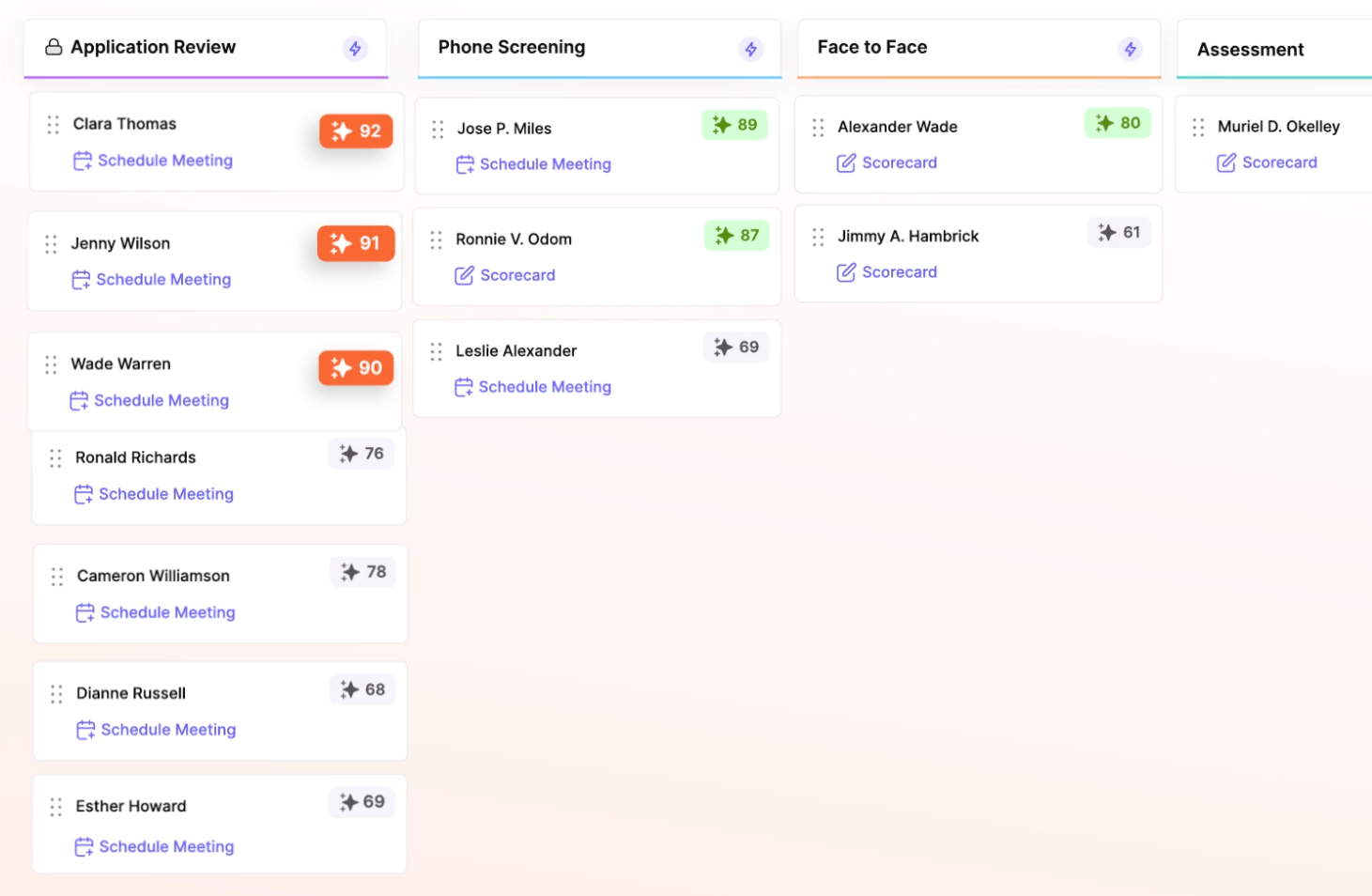
That reduces the need to jump between systems and makes pipeline management feel like an active workflow, not just a tracking layer.
3. Candidate database (long-term hiring asset)
Most teams think of an ATS as a place to manage active applicants. In reality, a high-quality applicant tracking software becomes much more valuable over time.
And that happens because every candidate who has applied, been sourced, or interviewed becomes part of a searchable, reusable database:
- Past applicants can be rediscovered for new roles
- Silver-medalist (or almost finalized) candidates don’t get lost
- Sourcing efforts compound instead of resetting
The key is how well the system connects that data. If you have an ATS that simplifies data retrieval, you can easily uncover past candidates for future job openings.
This is also a great way to tap into passive candidates who may have potential for future open roles in your organization.
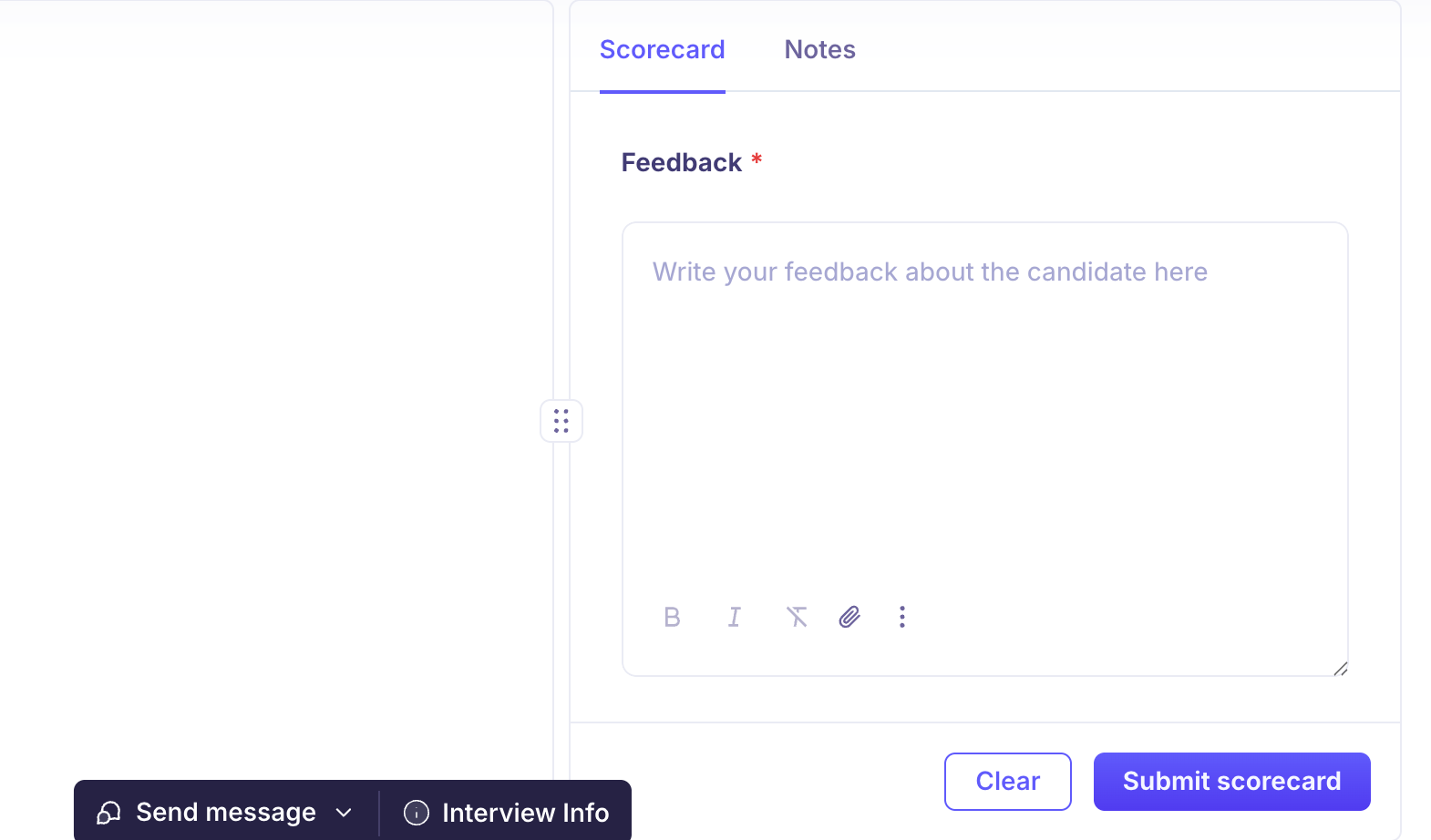
4. Collaboration and structured evaluation
Hiring breaks down when feedback is inconsistent.
Some interviewers leave detailed notes, others leave none. Decisions happen in Slack threads or meetings, and context gets lost.
An ATS should enforce structure through:
- Standardized scorecards
- Role-specific evaluation criteria
- Centralized feedback tied to each candidate
These aren’t just important features for data organization, but it also directly impacts hiring quality.
Kula extends this further with AI-powered interview intelligence.
Instead of relying entirely on manual note-taking, interviews can be recorded, transcribed, and summarized, with scorecards partially auto-filled.
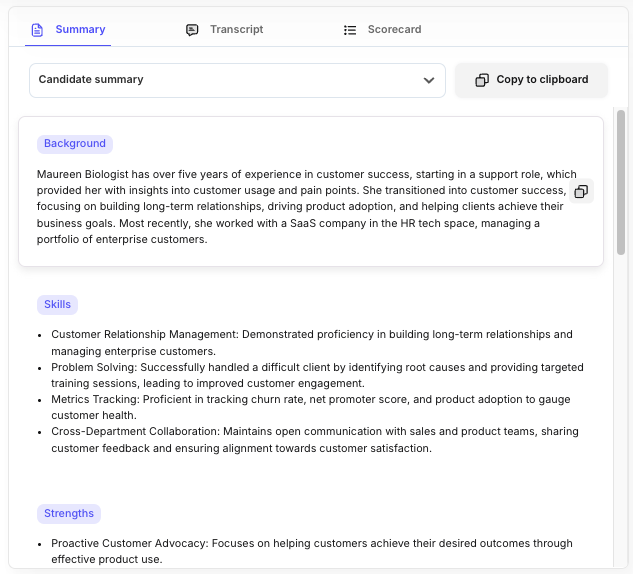
This kind of automated note-taking reduces bias from incomplete feedback and ensures that decisions are based on consistent, comparable inputs.
5. Job posting and distribution
Getting candidates into the pipeline is the first bottleneck.
Manually posting roles across platforms creates inconsistencies and limits reach. An ATS should centralize this by:
- Publishing jobs from one system
- Distribution across multiple job boards
- Tracking source performance
With Kula, jobs can be distributed across 100+ job boards while also being published on branded career pages built directly within the platform. This combination helps teams increase inbound volume while keeping everything tied back to a single system.
Once the fundamentals are in place, the next layer is about reducing manual effort and improving decision-making.
For this, you’ll need an ATS with more advanced features like:
6. AI candidate matching and prioritization
High application volume creates a new problem: too many profiles to review manually.
Traditional ATS platforms rely on filters and keywords. That works up to a point, but it’s rigid and often misses strong candidates.
AI-based matching adds another layer by:
- Evaluates candidates across multiple signals
- Ranking profiles based on role fit
- Adapting to the criteria defined by the hiring team
In Kula, this shows up as AI scoring tied to job-specific requirements, where recruiters can define what matters (skills, experience, priorities) and see candidates ranked accordingly.

The goal isn’t to replace human judgment, but to reduce the initial noise so recruiters can focus on higher-quality profiles faster.
7. Interview scheduling
Scheduling is one of the most time-consuming parts of hiring, not because it’s complex, but because it’s repetitive and coordination-heavy.
An ATS should:
- Match interviewer availability
- Allow candidates to self-select slots
- Handle rescheduling automatically
This has a direct impact on time-to-hire.
Kula approaches this with automated scheduling and interviewer pool balancing, which aligns availability in real time and reduces conflicts or delays.
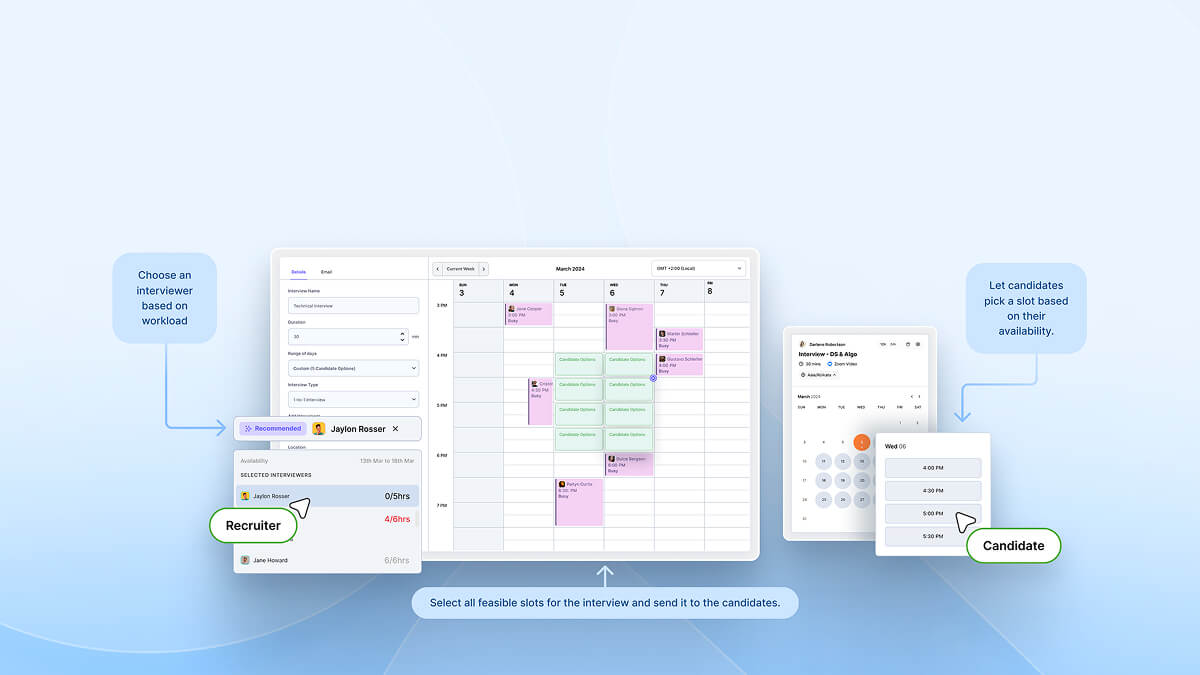
For teams running multiple interview loops, this removes a significant amount of manual coordination and helps offer a better candidate experience.
8. Candidate communication automation
Candidate communication is one of the first things to break as hiring scales.
Follow-ups get delayed, updates are inconsistent, and candidates are left guessing. That’s not just a bad candidate experience, but it leads to drop-offs.
In fact, over 60% of candidates report being ghosted during the hiring process, which is usually a breakdown in process, not intent.
An ATS should make communication system-driven, not manual:
- Automatic status updates tied to pipeline stages
- Reminders for pending actions (like feedback or next steps)
- Triggered outreach without relying on recruiters to follow up manually
But the real gap is personalization. A lot of recruiting tools can automate messages but only a few make them relevant.
Kula addresses this by connecting communication directly to candidate data and workflow context:
- AI-generated, personalized outreach templates that incorporate candidate skills, experience, and profile data.
- Stage-based triggers so candidates are updated automatically as they move through the pipeline.
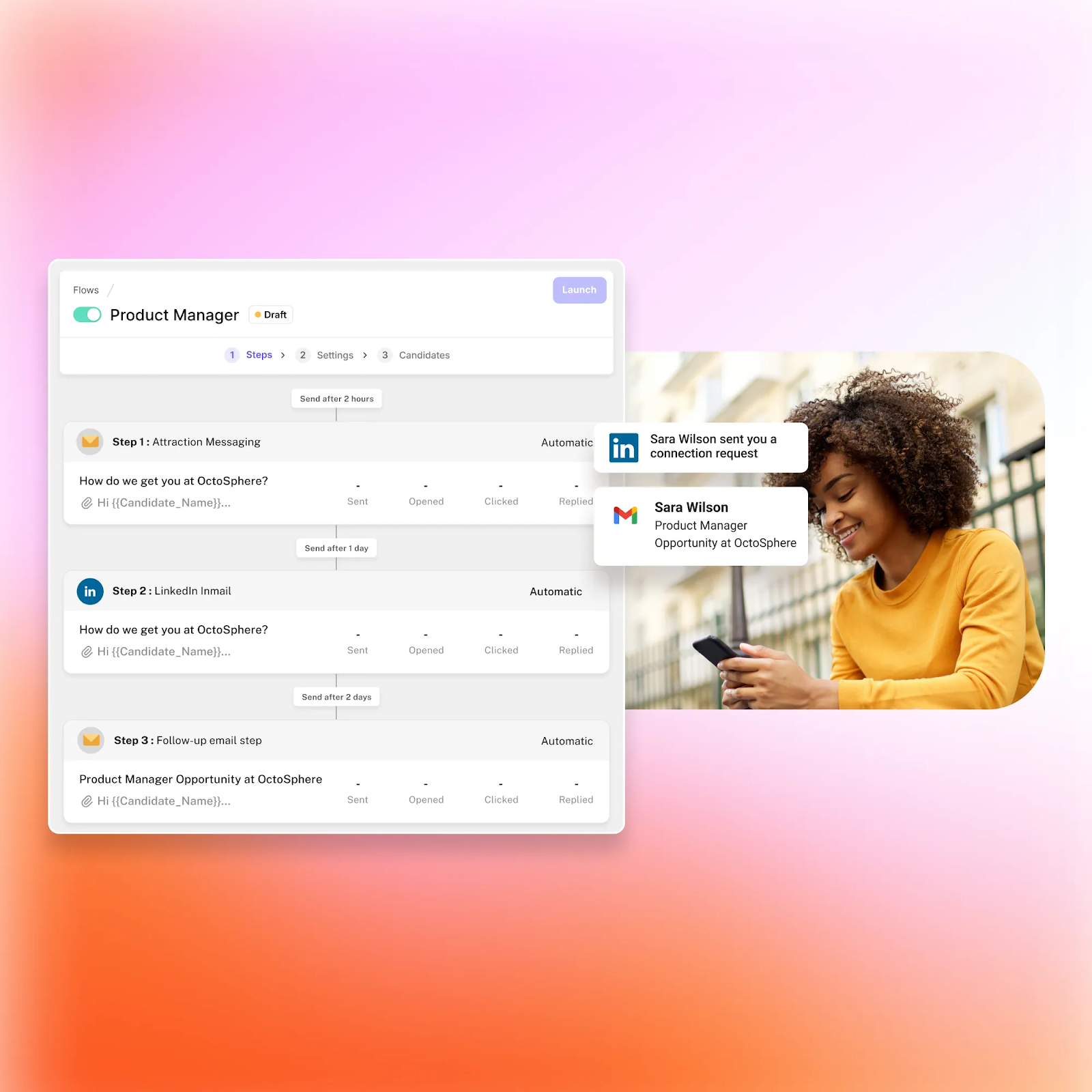
- Multi-channel messaging (email + LinkedIn) managed from within the ATS.
- A unified interaction timeline, so every message, response, and touchpoint is visible in one place.
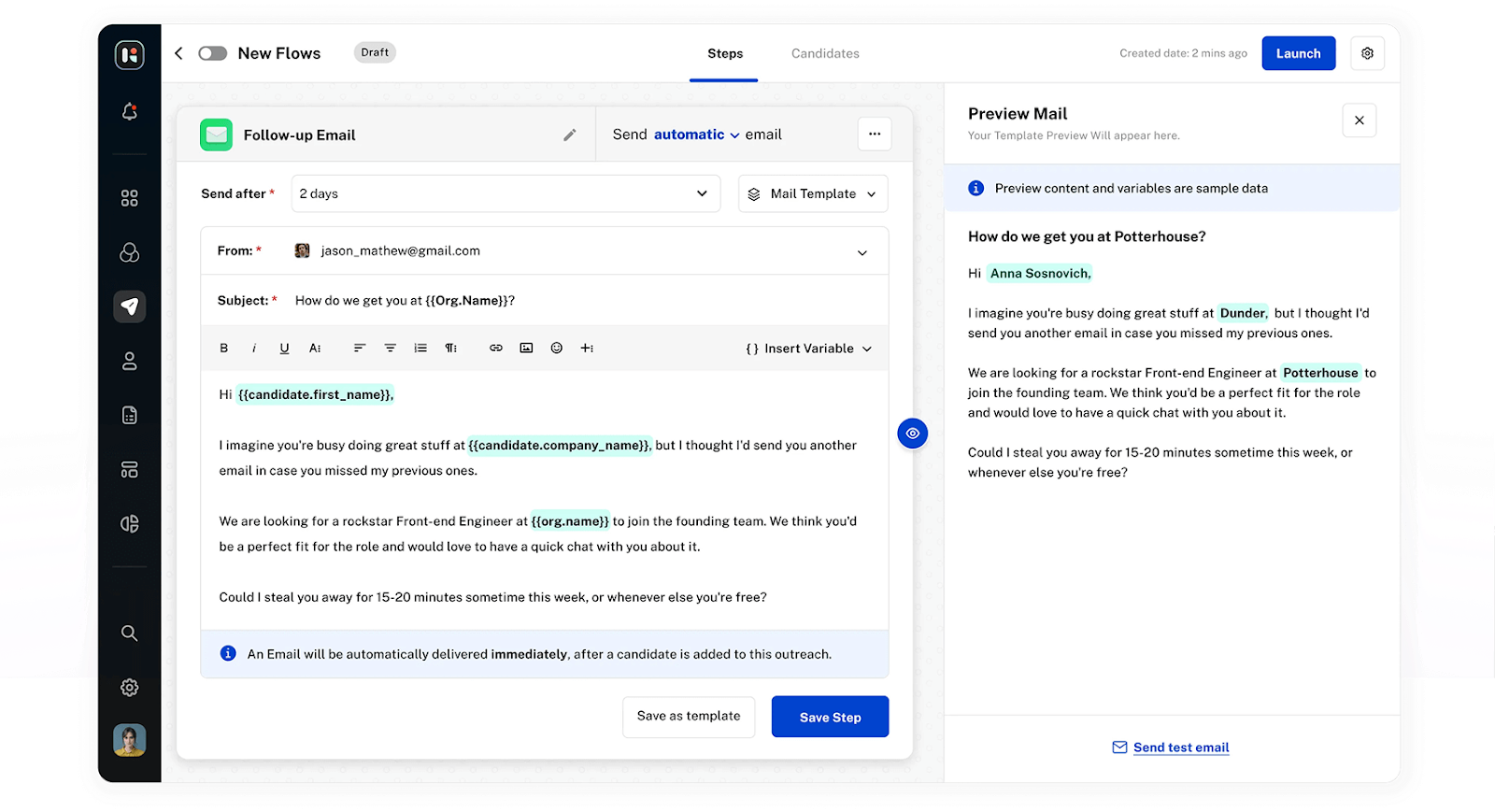
With Kula, hiring teams can achieve a candidate communication process that scales without becoming generic, preventing candidates from getting lost between stages.
9. Integrations
An ATS works best when it connects seamlessly with the rest of your hiring stack, not when teams have to switch tools or re-enter data at every step.
At a baseline, ATS integrations should cover:
- HRIS and payroll systems to move candidates into employee records without manual handoffs.
- Background check tools to trigger and track verifications within the hiring workflow.
- Video interviewing and assessment platforms so interviews, tests, and feedback stay connected to the candidate profile.
- E-signature tools to send, sign, and track offers without delays.
The difference shows up in how connected this actually feels in practice.
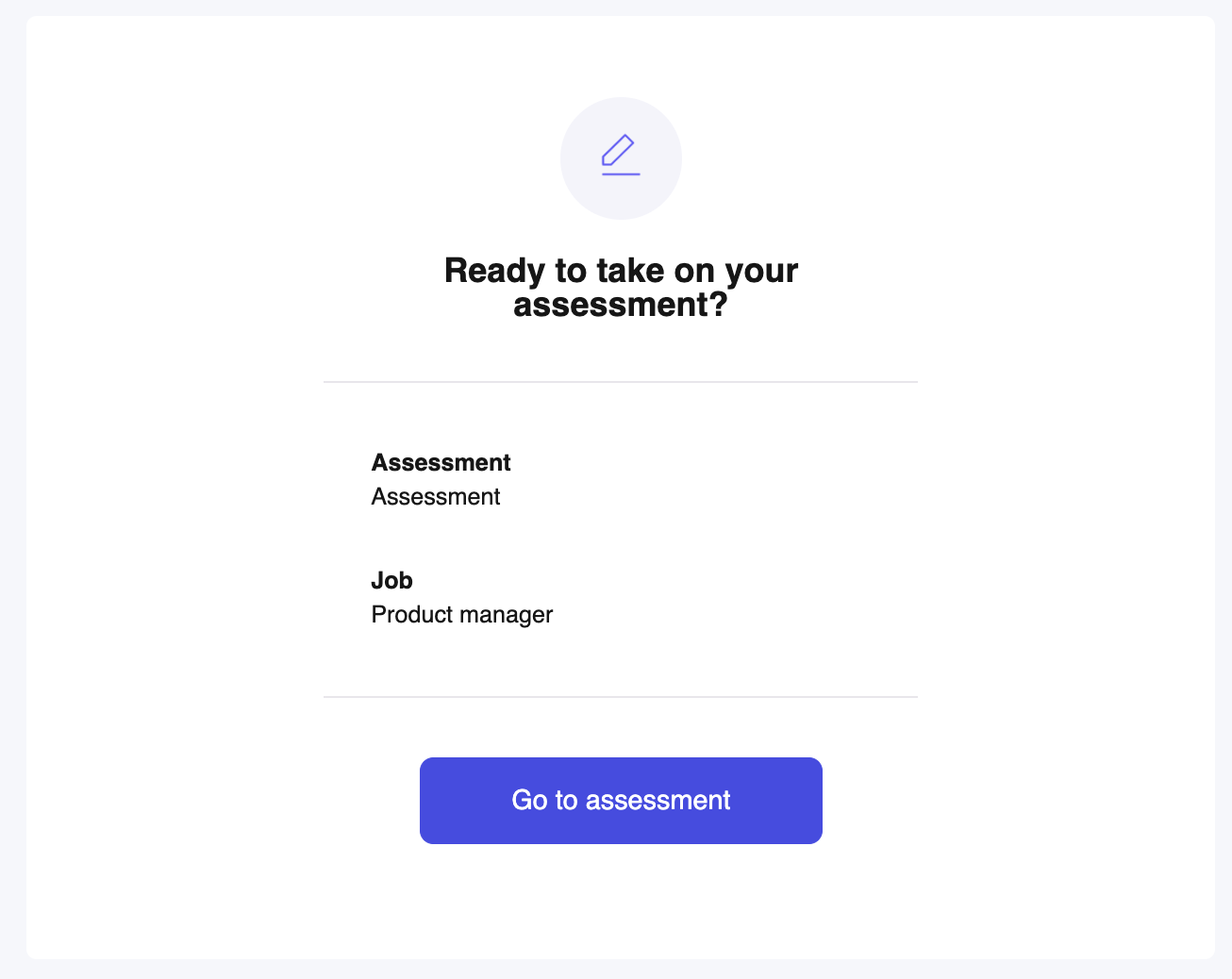
Instead of relying heavily on external tools, Kula brings several of these workflows directly into the ATS—including built-in video interviewing and assessments, so evaluation stays tied to the candidate record from end to end.
When closing new hires, Kula even integrates with DocuSign and PandaDoc, so teams can generate and send offers without leaving the platform.
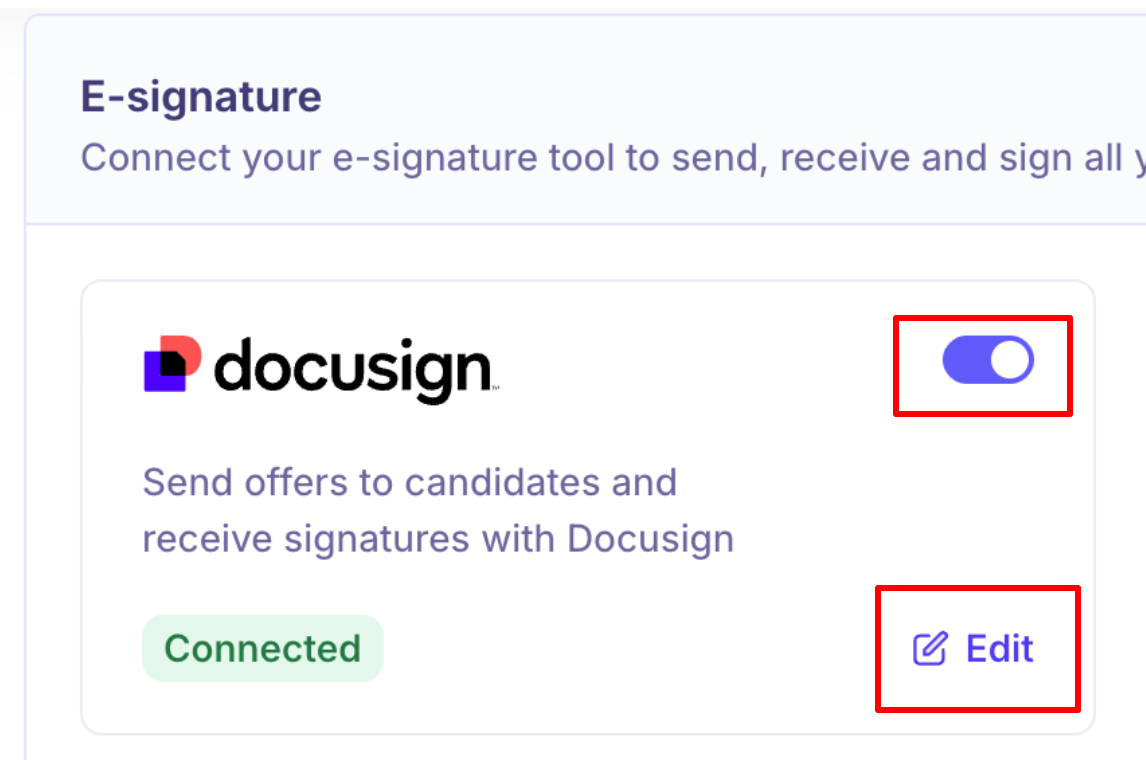
This reduces context switching and keeps the entire hiring process (from sourcing to offer management) under one continuous system.
ATS pricing and costs
Two companies of the same size can end up paying very different amounts depending on how they hire, how many people use the system, and how much customization they need.
That said, there are a few consistent ATS pricing models and patterns across the market. Most vendors price their product in one of these ways:
- Per recruiter seat: Pricing is based on the number of users (usually recruiters or hiring team members). This is common for smaller and mid-market tools.
- Per employee (company size-based pricing): Pricing scales with total company headcount. Often used by enterprise platforms tied closely to HR systems.
- Flat subscription: A fixed monthly or annual fee for access to the platform, sometimes with usage limits or feature tiers.
- Enterprise contracts: Custom pricing based on hiring volume, integrations, support, and compliance needs. Typically negotiated annually.
In practice, many vendors combine these models. For example, a base platform fee + per-seat pricing.
While pricing varies widely, these ranges give a general benchmark:

These ranges depend heavily on ATS features, scale, and vendor positioning. Keep in mind that pricing isn’t just about company size. It’s shaped by how complex your hiring setup is.
Key cost factors include:
- Number of recruiters/users: More users typically increase costs in seat-based pricing models.
- Hiring volume: Some platforms price based on the number of open roles or hires per year.
- Integrations: Connecting with HRIS, background checks, assessments, and other tools can increase costs, especially if custom integrations are needed.
- Customization and workflows: The more tailored your hiring process (approval flows, pipelines, reporting), the more setup and configuration is required.
- Support and onboarding: Enterprise plans often include dedicated support, SLAs, and implementation services, which are factored into pricing.
If you think investing in an ATS is a big cost, the operational overhead of a hiring workflow without the right recruiting software actually ends up being far more costly in the long run due to:
- Time spent switching between tools
- Manual coordination across systems
- Delays caused by disconnected workflows
This is why many teams move toward more consolidated platforms.
Instead of paying separately for scheduling tools, assessment platforms, analytics tools, and communication layers, systems like Kula bring these into a single ATS—including built-in scheduling, video interviews, assessments, and analytics, along with integrations like DocuSign for offers.
The trade-off becomes clear: lower software cost vs lower operational cost.
And for most scaling teams, the latter ends up mattering more.
How to choose the right ATS
Most ATS buying decisions go wrong for one reason: teams compare features without mapping them to how they actually hire.
The better approach is to start with what your existing hiring process looks like in terms of reality volume, workflows, team structure, and then evaluate systems against that. Here’s a practical way to do it:
Step 1: Define your hiring volume and complexity
Start with the basics:
- How many roles do you hire for each year?
- How many candidates do you process per role?
- How many people are involved in hiring decisions?
A team hiring 5 roles a quarter doesn’t need the same system as one hiring across multiple functions and regions.
Volume and complexity should determine whether you need a basic, mid-market, or more advanced (AI-native/enterprise) ATS.
Step 2: Map your current hiring workflow
Before evaluating tools, map how hiring actually works today:
- How candidates move from application to offer
- Where delays typically happen
- Which steps require the most manual effort
This helps you identify what the ATS needs to fix.
For example:
- If scheduling slows you down → prioritize automation
- If screening is overwhelming → prioritize AI-assisted filtering
- If decisions are inconsistent → prioritize structured evaluation
Without this step, it’s easy to overpay for features you don’t need or miss out on the ones you do.
Step 3: Check integrations with your existing stack
Your ATS won’t operate in isolation. Make sure it connects with the tools you already use:
- HRIS and payroll systems
- Background checks
- Assessments
- Communication tools
Also look at how much the ATS consolidates.
Platforms like Kula reduce the need for multiple tools by bringing sourcing, job role distribution, scheduling, interviews, assessments, analytics, and communication into one system. This can significantly reduce operational complexity.
This way, you won’t end up paying for extra tools in your tech stack, which only ends up adding costs and creates a more disintegrated system.
Step 4: Evaluate candidate experience
A lot of ATS evaluations focus only on internal workflows, but that’s a mistake. Your recruiting software should also shape how candidates experience your hiring process:
- How easy is it to apply?
- Do candidates get timely updates?
- Can they schedule interviews without friction?
Poor candidate experience leads to drop-offs and weaker employer brands, especially in competitive roles.
Step 5: Test usability (not just features)
An ATS can have strong features and still fail if it’s hard to use. Look at:
- How intuitive the interface is
- How many steps common actions take
- Whether recruiters and hiring managers actually adopt it
The best systems reduce effort. If your team needs training for basic workflows, it will slow things down. You can usually get an idea about system usability through demo calls with sales teams.
Step 6: Run a pilot before committing
Before making a long-term decision, test the system in a real hiring scenario. This means:
- Running an actual role through the pipeline
- Involving recruiters and hiring managers
- Evaluating how the system performs across stages
This is usually where most gaps show up, not in demos.
To make this easier, here’s a simple checklist to stay grounded while evaluating ATS platforms for your team:
- Career site and job distribution: How easy is to publish and manage roles?
- Automation: Can you automate interview scheduling, communication, and workflow triggers?
- Integrations: Does the platform connect with your existing tools?
- Analytics: Does the ATS provide visibility into pipeline performance and hiring metrics?
- Compliance: Can you get insights on audit trails, structured data, and process consistency?
The right ATS isn’t the one with the most features. It’s the one that fits how your team hires and removes the friction that slows you down today.
Best practices for ATS implementation
Depending on complexity, ATS implementation typically ranges from 2–6 weeks for smaller teams to 2–4+ months for enterprise rollouts (especially when data migration, integrations, and approvals are involved).
Teams that rush this phase usually end up rebuilding workflows later. To ensure a smooth implementation process, that benefits you in the long run, here’s what you should ensure:
Before implementation
This phase determines whether your ATS simplifies hiring or just mirrors existing chaos.
- Map your hiring workflow (as it actually runs): Don’t document the ideal process, map the real one that currently exists for your team. Where do candidates drop off? Where do approvals get delayed? Where does communication break? These are the gaps your ATS needs to solve.
- Audit your current hiring stack: Most teams are already using 4–8 tools across sourcing, scheduling, assessments, and communication. Decide what stays, what integrates, and what should be replaced or consolidated.
- Define hiring stages and decision criteria: Standardize interview stages, scorecards, and evaluation signals. If this isn’t clear before implementation, the ATS won’t fix inconsistency, it will just scale it.
During implementation
This is where most of the heavy lifting happens, and where attention to detail matters.
- Migrate data with structure (not just volume): Importing candidates isn’t enough. Data needs to be clean, deduplicated, and searchable. Poor migration leads to cluttered databases that teams stop using.
- Configure workflows based on real usage: Pipelines, automations, and communication triggers should reflect how your team actually hires, not default templates.
For example, systems like Kula allow teams to configure:- Role-specific pipelines
- Automated scheduling flows
- Stage-based communication triggers, so the system actively removes manual coordination instead of adding another layer of tracking
- Train recruiters and hiring managers properly: Adoption is the biggest failure point. Recruiters need to know how to:
- Manage pipelines efficiently
- Use automation instead of manual follow-ups
- Interpret analytics and pipeline data
- Hiring managers also need clarity on:
- How to leave structured feedback
- How decisions are captured within the system
- Without this, teams fall back to Slack, email, and spreadsheets.
After launch
Going live isn’t the finish line. It’s where optimization starts.
- Monitor process-level metrics (not just outcomes): Don’t just track time to hire. Look at metrics that reveal where the system needs adjustment:
- Stage-by-stage conversion rates
- Interview-to-offer ratios
- Scheduling delays
- Refine workflows continuously: Hiring processes evolve and your ATS should too. Update pipelines, automation rules, and evaluation criteria based on real usage.
- Collect feedback from actual users: Recruiters will quickly tell you what slows them down. If the system feels heavy, they’ll work around it, which defeats the purpose of having an ATS.
Common pitfalls to avoid during ATS implementation
Most ATS implementations don’t fail because of the tool. They fail because of how it’s configured and used.
- Bad resume parsing setup: Inconsistent or poorly structured data makes searching and filtering unreliable, which slows down screening.
- Overly strict keyword filters: Rigid screening rules can filter out strong candidates, especially in roles where experience isn’t standardized.
- Poor candidate experience: Long application forms, lack of updates, and clunky scheduling flows lead to drop-offs, even if the backend is well-structured.
- No real recruiter training: If recruiters don’t adopt the system fully, workflows break and hiring becomes fragmented again.
ATS metrics and KPIs to track
An ATS gives you access to a lot of hiring data. And the challenge isn’t collecting it, but understanding what to do with it.
Here are the core metrics that teams rely on, along with what they actually help you understand.
1. Time to hire
Time to hire measures how long it takes for a candidate to move from application to offer acceptance.
This metric is closely tied to how efficiently your internal process runs. When it starts increasing, the reason is usually somewhere inside the pipeline—delays in screening, slow interview scheduling, or feedback not coming in on time.
Looking at the overall average doesn’t give much clarity. Breaking it down by stage is far more useful, because it shows exactly where candidates are spending the most time.
2. Time to fill
Time to fill tracks how long it takes to close a role from the moment it is opened.
Unlike time to hire, this metric reflects both recruiting execution and how well the role is defined upfront. Delays here are often linked to shifting requirements, slow approvals, or unclear expectations from hiring teams.
This makes it a useful signal not just for recruiting, but for how aligned the organization is on hiring.
3. Cost per hire
Cost per hire calculates the total investment required to make a hire.
This includes sourcing spend, agency fees, recruiter time, and tools. On its own, the number doesn’t say much. The value comes from understanding where that cost is being spent and whether it is leading to successful hires.
Some sources may look inexpensive but generate low-quality candidates, increasing time and effort elsewhere in the process. Others may cost more upfront but lead to faster, stronger hires.
4. Source of hire
Source of hire shows where successful candidates are coming from.
This metric is often misunderstood because it’s easy to focus on volume instead of outcomes. A source that drives a large number of applications may not contribute much to actual hires.
The more useful approach is to look at how candidates from each source move through the pipeline:
- How many reach interviews
- How many receive offers
- How many convert into hires
5. Offer acceptance rate
Offer acceptance rate measures how many candidates accept the offers extended to them.
This metric is influenced by multiple factors, including compensation, candidate experience, and how the hiring process is handled. Delays, lack of communication, or misalignment during interviews often show up here.
By the time an offer is made, candidates usually have a clear perception of the role and the company, so issues earlier in the process tend to surface at this stage.
6. Candidate drop-off rate
Candidate drop-off rate tracks where candidates exit the hiring process.
Looking at this metric across different stages helps identify friction points. For example, a high drop-off after application may indicate a complicated application process, while drop-offs after interviews can point to delays or gaps in communication.
This is one of the more practical metrics for improving candidate experience and pipeline efficiency.
7. Quality of hire
Quality of hire reflects how well new hires perform and how long they stay with the company.
It is usually measured through a combination of performance, retention, and hiring manager feedback. The challenge is connecting this back to earlier stages of the hiring process.
Over time, patterns start to emerge—certain sources, evaluation signals, or interview stages may correlate more strongly with successful hires than others.
These metrics are most useful when they are connected and easy to explore.
Teams need to be able to:
- Break metrics down by role, stage, and source
- Track how candidates move through the pipeline
- Quickly identify where delays or drop-offs are happening
In Kula, hiring metrics are easy to understand and act on.
You get live dashboards that show pipeline health, candidate inflow, and pending actions at a glance, along with clear visibility into recruiter performance across roles and stages.
Reports are ready to use or fully customizable, so you can track pipeline, offers, and sources without building from scratch.
And with conversational AI, you can simply ask questions like “why is hiring slowing down?” and get instant answers—no digging through dashboards.
Best ATS platforms for your recruiting team
There’s no single “best” ATS. The right choice depends on how your team hires, how much structure you need, and whether you’re optimizing for efficiency, collaboration, or outbound recruiting.
Here’s a breakdown of some of the most widely used platforms, with a focus on where each one fits best.

1. Kula
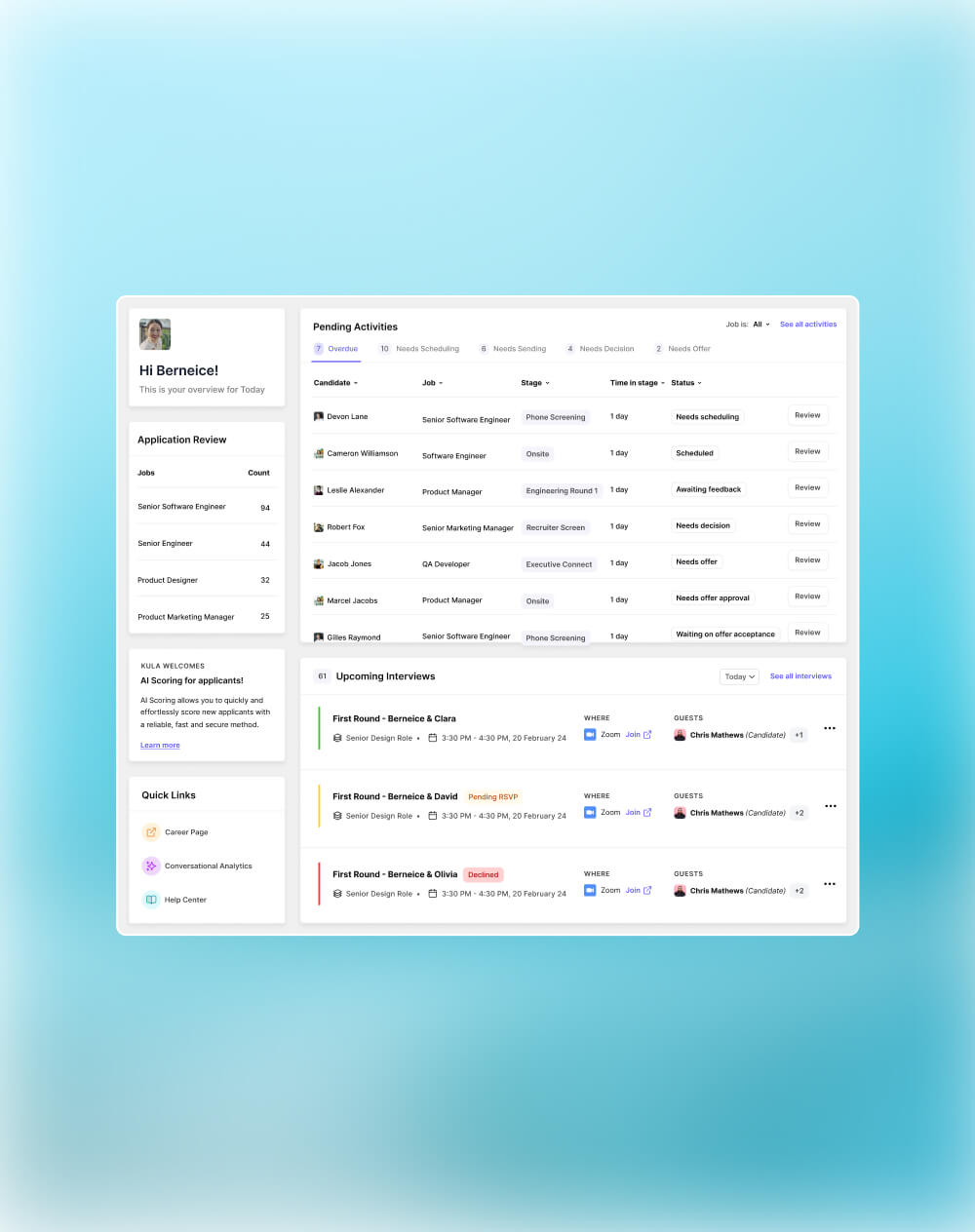
Kula positions itself as an AI-native, all-in-one hiring system, combining ATS, CRM, scheduling, interview intelligence, and analytics in a single platform.
Instead of stitching together multiple tools, it focuses on consolidating workflows so recruiters can manage sourcing, evaluation, and decision-making without context switching.
The platform leans heavily into automation and real-time insights, especially through AI scoring and conversational analytics.
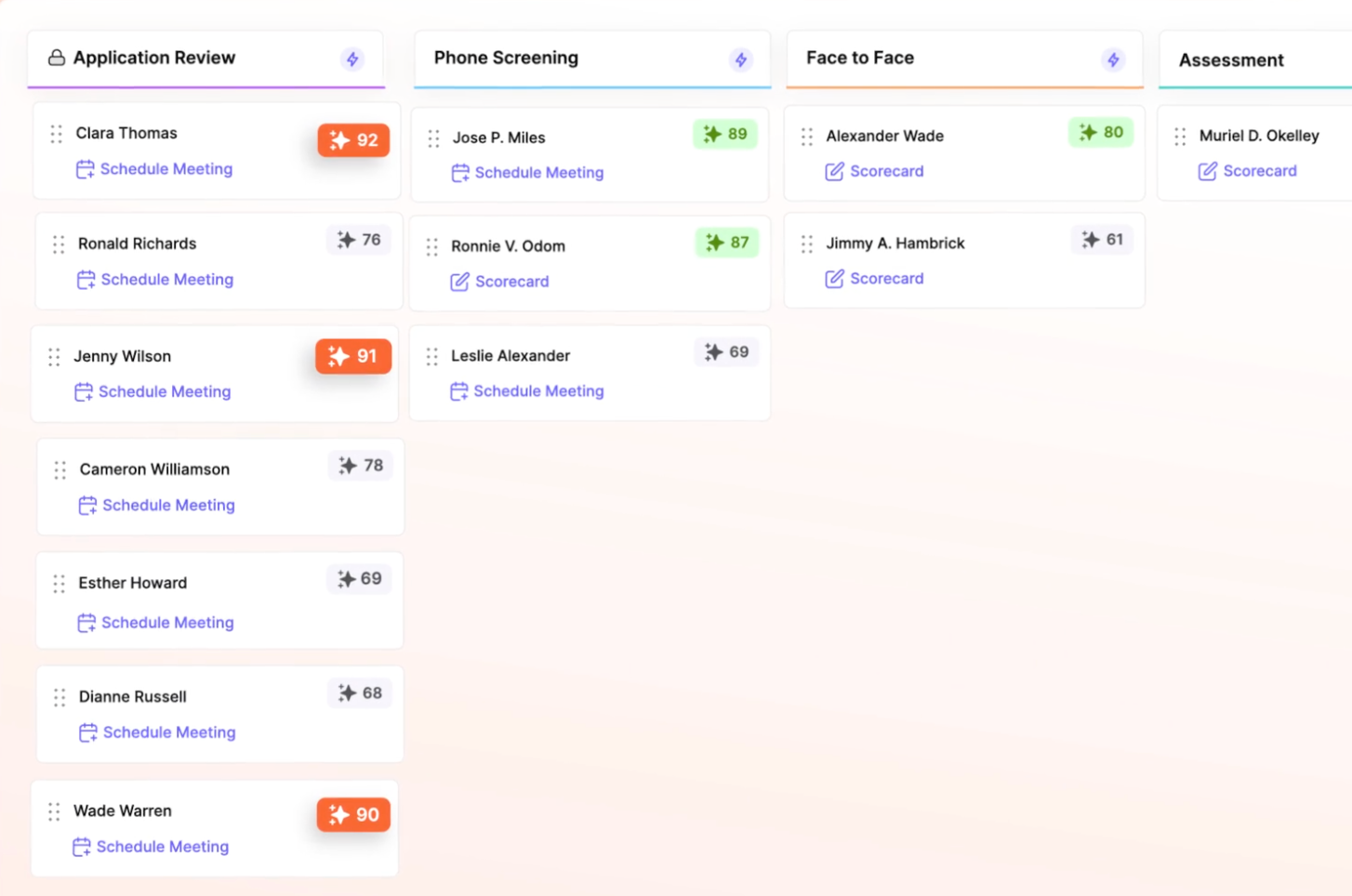
Best for: Teams that want an all-in-one AI-native hiring platform with strong automation, built-in workflows, and real-time analytics without relying on multiple tools.
Key strengths:
- AI scoring tied to role-specific criteria for faster shortlisting
- Built-in interview scheduling, video interviews, AI-powered notetaking, and assessments (reduced tool sprawl)
- Strong analytics layer with dashboards, custom reports, and conversational AI
- Unified workflows across sourcing, pipeline management, and communication
- Chrome extension for sourcing candidates directly from LinkedIn onto your ATS
- Build custom career portals within your ATS
Limitations:
- Newer tool compared to legacy ATS platforms
- May require process alignment to fully benefit from its consolidated approach
Typical users:
- Scaling startups and mid-market companies
- Teams moving away from fragmented recruiting stacks
- Recruiters looking to reduce manual coordination and tool switching
2. Gem
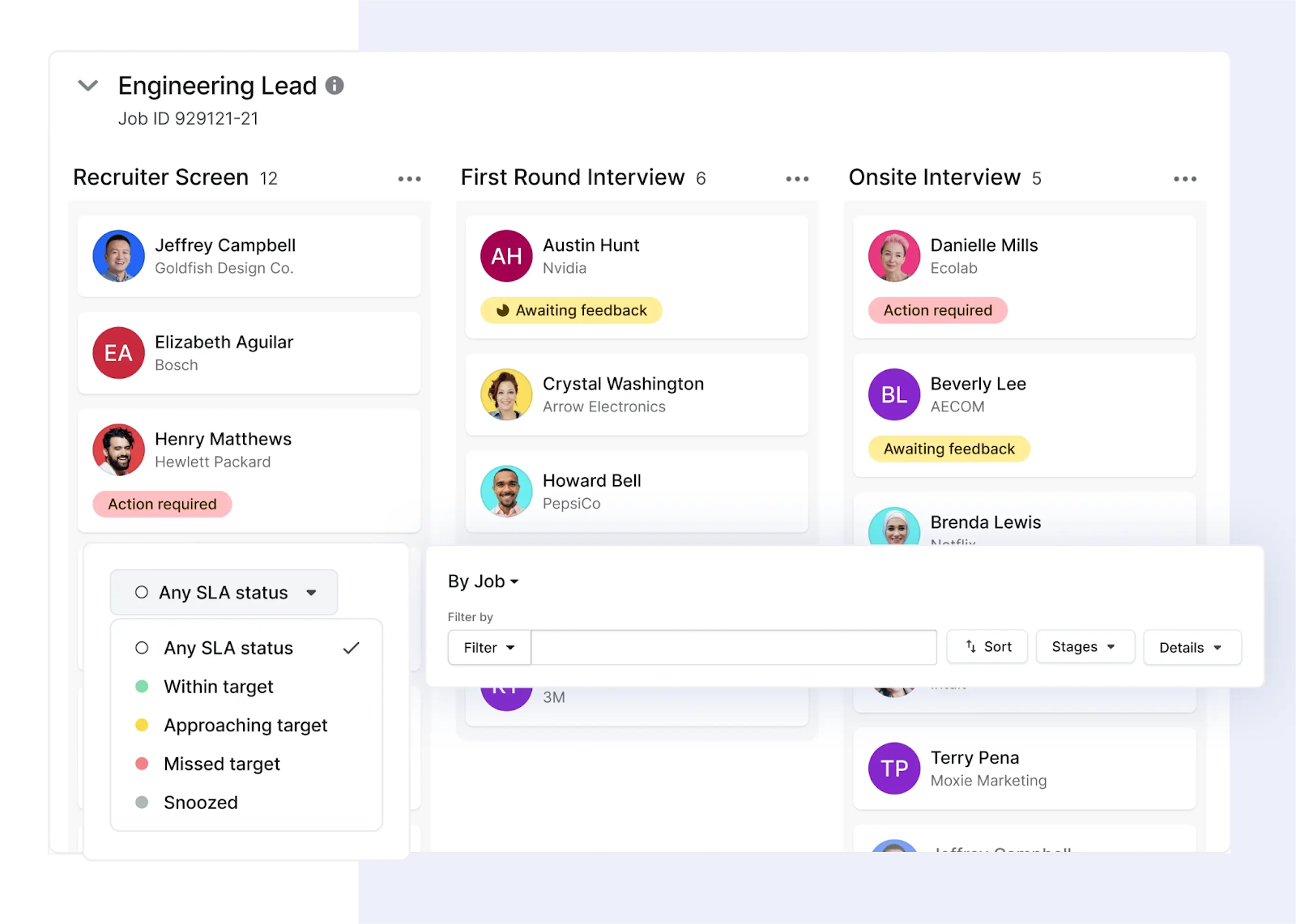
Gem started as a top-of-funnel recruiting platform and is still best known for outbound sourcing, email sequencing, and pipeline visibility.
Over time, it has expanded into ATS functionality, but its core strength remains in helping teams build and engage talent pipelines proactively. Many teams still use Gem alongside another ATS rather than as a full system of record.
Best for: Teams focused heavily on outbound recruiting and pipeline building.
Key strengths:
- Strong sourcing and outreach workflows
- Deep visibility into candidate engagement and pipeline activity
- Good analytics around recruiting funnel performance
Limitations:
- Limited reporting and customization
- Some users report the platform to be heavy and not as intuitive as other ATS tools
Typical users
- Sourcing-heavy recruiting teams
- Companies hiring for hard-to-fill or niche roles
- Teams prioritizing outbound over inbound
3. Greenhouse
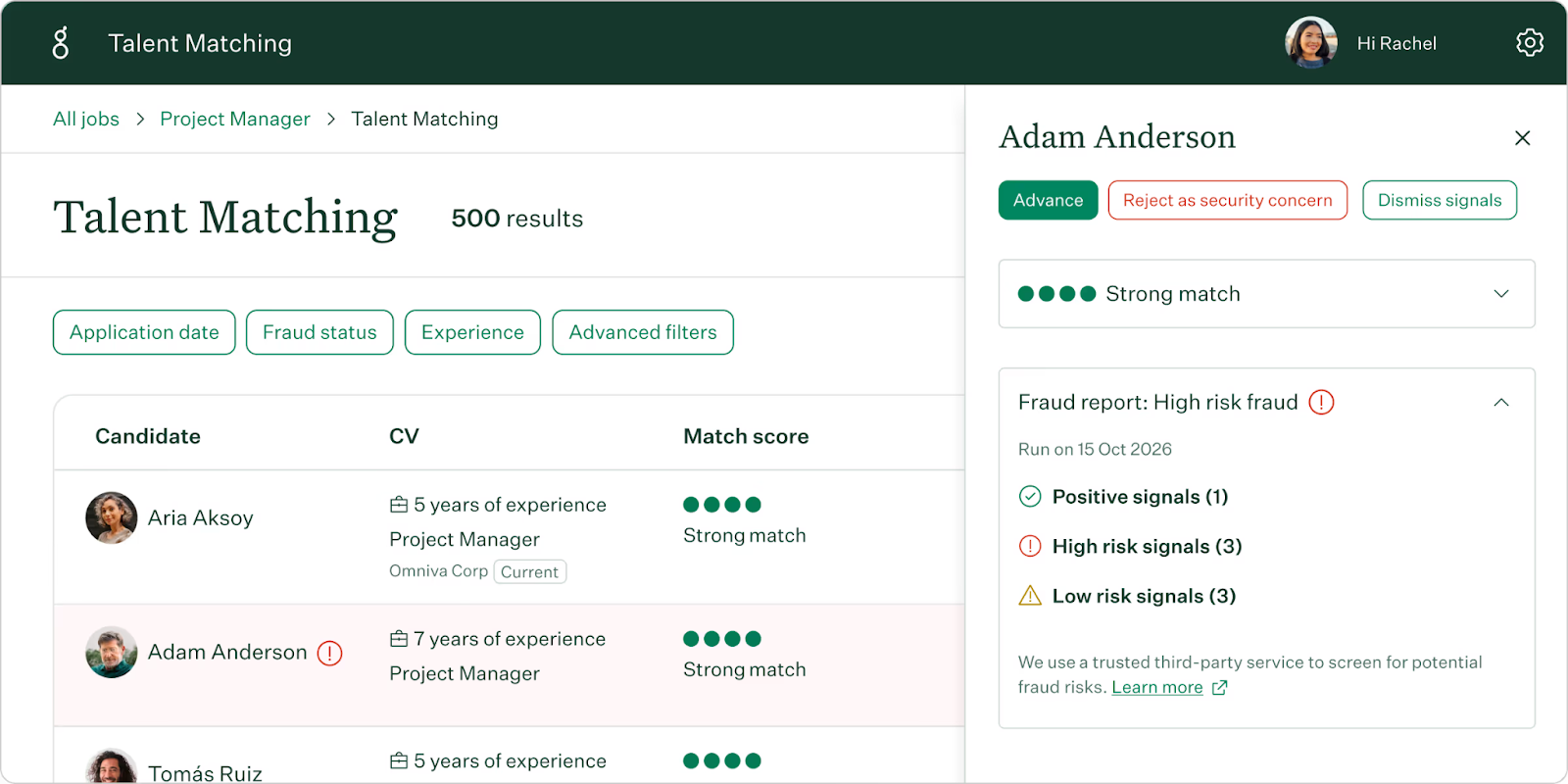
Greenhouse is one of the most widely adopted ATS platforms, built around the concept of structured hiring.
It emphasizes consistency through defined interview plans, standardized scorecards, and clear evaluation frameworks. The platform has a large integration ecosystem and is often seen as a “process-first” system, especially in mid-market and enterprise environments.
Best for: Organizations that want a highly structured, process-driven hiring system.
Key strengths:
- Strong interview planning and structured scorecards
- Mature ecosystem with extensive integrations
- Well-defined workflows for consistent hiring practices
Limitations:
- Can feel rigid and process-heavy
- Requires setup and ongoing maintenance to work effectively
- Additional tools often needed for sourcing and analytics
Typical users:
- Mid-market to enterprise companies
- Teams focused on structured, repeatable hiring processes
- Organizations with dedicated recruiting operations
4. Ashby
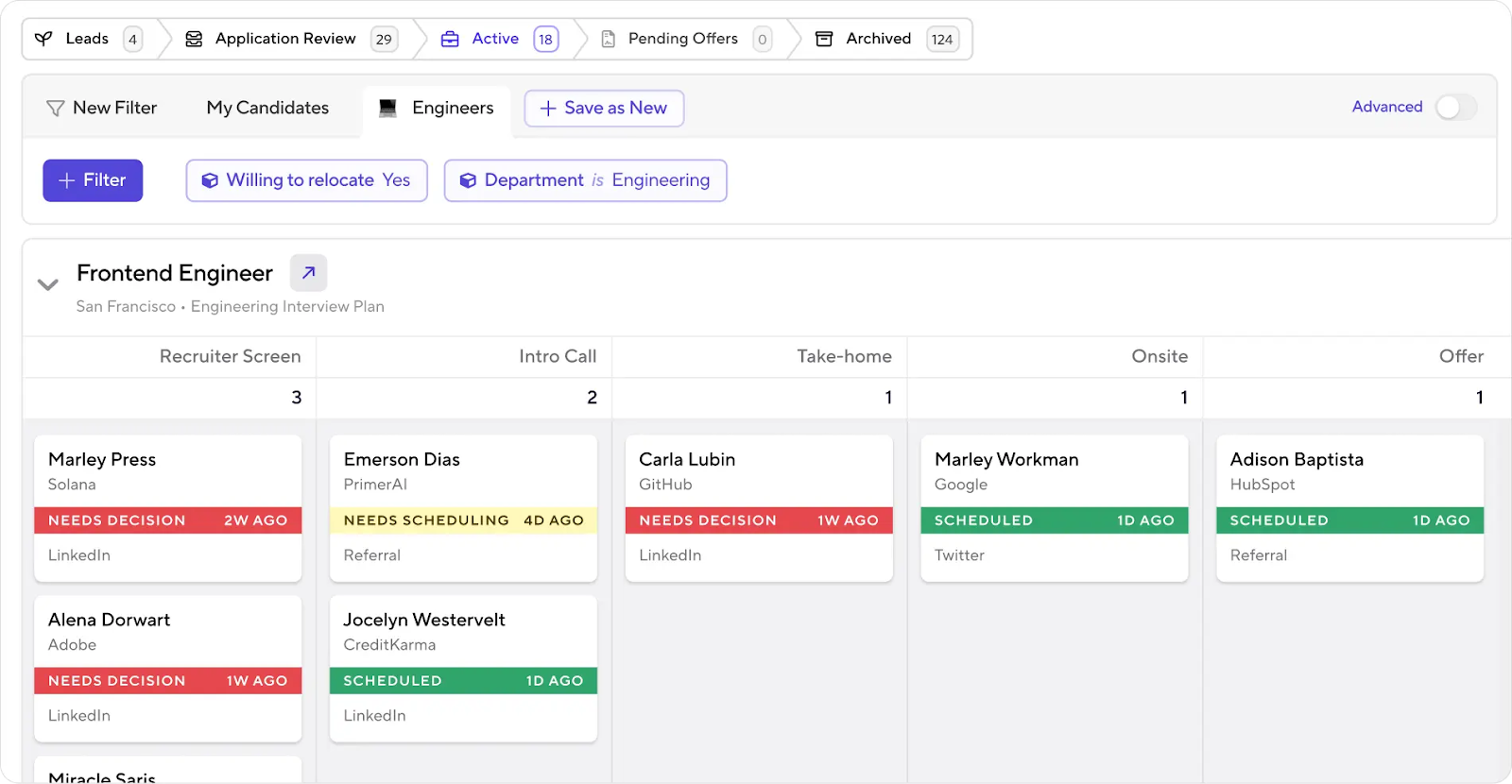
Ashby is a platform that combines ATS, CRM, and deep analytics into a single platform, with a strong focus on data accessibility.
It’s particularly known for giving recruiting teams granular control over reporting and pipeline analysis without needing external business and analytics tools. The product is designed for teams that want flexibility and visibility rather than rigid workflows.
Best for: Data-driven recruiting teams that want deep visibility into hiring performance.
Key strengths:
- Advanced analytics and reporting capabilities
- Flexible workflows and customization
- Combines ATS and CRM functionality in one platform
Limitations
- Steeper learning curve due to depth of features
- May feel heavy for smaller teams with simpler needs
Typical users:
- Growth-stage startups
- Recruiting teams that rely heavily on data and reporting
- Organizations building more sophisticated hiring operations
5. Lever
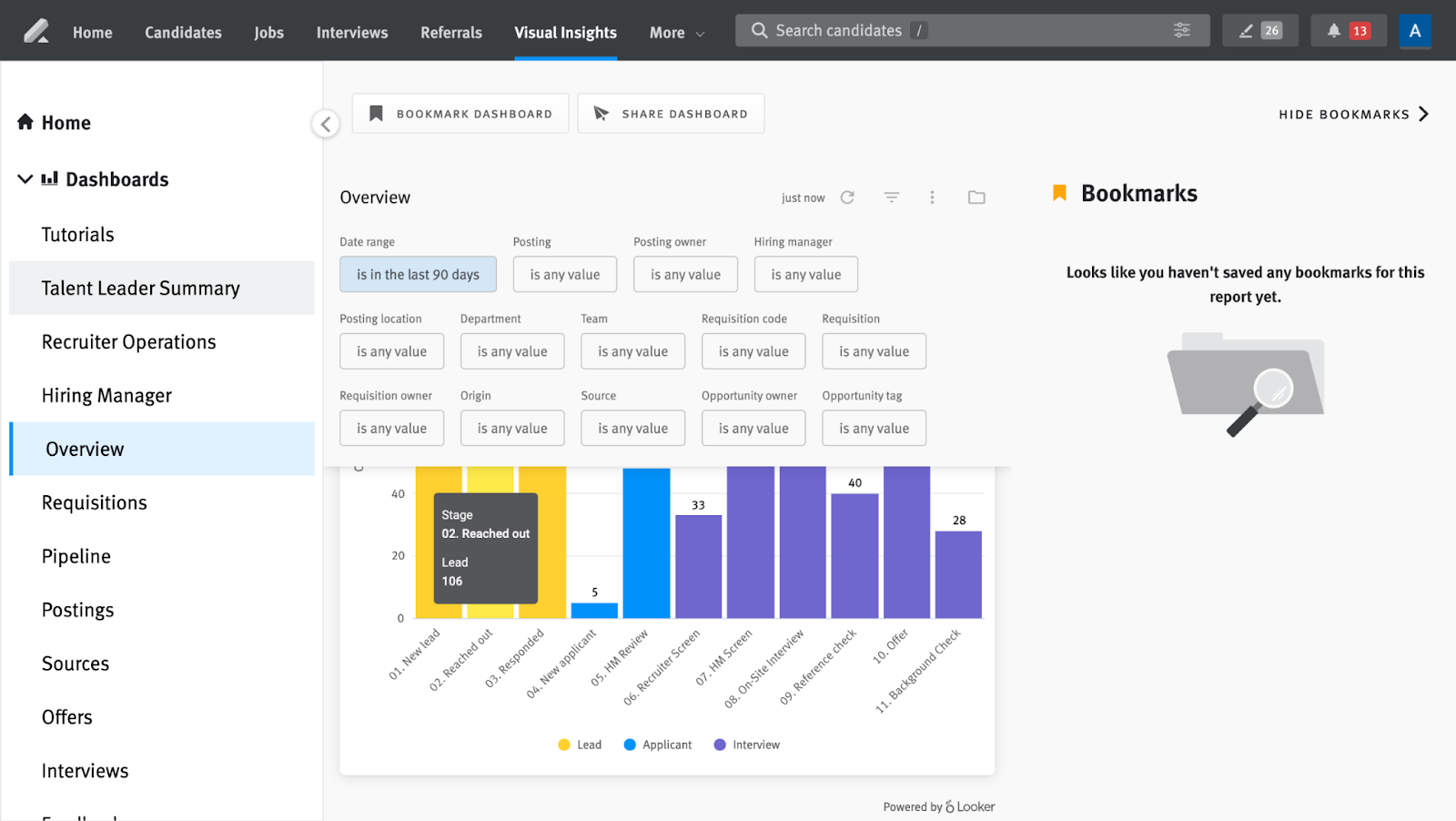
Lever combines ATS and CRM functionality, focusing on collaboration and candidate relationship management.
It’s designed to support both inbound applicants and outbound engagement within the same system. The platform is generally considered more flexible and user-friendly than traditional enterprise ATS tools, though less advanced in analytics compared to newer platforms.
Best for: Teams that want a balance between inbound hiring and outbound engagement.
Key strengths:
- Strong candidate relationship management features
- Intuitive UI and collaboration workflows
- Good balance between ATS and CRM capabilities
Limitations:
- Reporting and analytics are less advanced compared to newer platforms
- Requires integrations for deeper functionality in some areas
Typical users:
- Mid-sized companies
- Teams managing both inbound and outbound hiring
- Organizations prioritizing collaboration across hiring teams
If you want a quick overview to understand which applicant tracking system is best for your needs, here’s a breakdown:
- If your biggest problem is too many tools and manual work → Kula
- If your biggest problem is finding candidates → Gem
- If your biggest priority is structured hiring discipline → Greenhouse
- If you care most about deep analytics and customization → Ashby
- If you want a balanced ATS + CRM with simple workflows → Lever
Can applicants manipulate an ATS?
To an extent, yes—but not in the way it’s often portrayed.
Candidates can optimize resumes with relevant keywords or formatting to improve visibility in keyword-based systems. But modern ATS platforms don’t “reject” resumes automatically as often as people think.
Most applicant tracking systems use filtering and ranking to help recruiters prioritize, not eliminate.
In practice, strong candidates still stand out through experience, clarity, and relevance. Keyword stuffing or over-optimization rarely works once a human reviews the profile.
The future of applicant tracking systems
1. AI-driven recruiting
AI is increasingly being used to handle time-intensive parts of the hiring process, especially in the early stages. This includes tasks such as sourcing candidates, screening resumes, and coordinating interviews.
According to Kula’s 2025 State of Recruiting report, 50–75% of recruiter tasks could be automated in the next five years, particularly administrative work like resume screening and scheduling
As these tasks become automated, the role of recruiters is shifting toward evaluation and decision-making. ATS platforms are adapting by providing better ways to prioritize candidates, analyze interview data, and surface insights that support more informed hiring decisions.
2. Skills-based hiring
Many organizations are moving away from relying solely on degrees and job titles and placing more emphasis on skills and demonstrated ability.
However, skills alone do not fully capture candidate potential. Hiring leaders are increasingly focusing on qualities such as adaptability, problem-solving, and learning ability.
In Kula’s report, Michael Brown, VP Global Talent Attraction at Snyk, explains:
“We’ll be less concerned with ‘skills’ and more obsessed with ‘cognitive flexibility’ and ‘existential curiosity’. The re- cruiter’s role will shift from matching keywords to under- standing the soul of the candidate, the spark that AI can’t replicate. We’ll be hiring for the problems we don’t even know we have yet.” — Michael Brown VP Global Talent Attraction, Snyk
To support this shift, ATS platforms are expanding beyond resume data to incorporate interview insights, assessments, and other signals that help teams evaluate candidates more holistically.
3. Integrated hiring platforms
Many recruiting teams rely on multiple tools for different parts of the hiring process, including sourcing, scheduling, assessments, and analytics.
This often leads to fragmented workflows, where data does not flow easily between systems and context is lost at different stages of the process.
As a result, ATS platforms are increasingly designed to either integrate deeply with other tools or bring key workflows into a single system. This helps ensure that candidate data, feedback, and decisions remain connected throughout the hiring process.
4. Compliance and AI regulation
As AI becomes more embedded in hiring, AI regulatory requirements are becoming more important.
Laws such as New York City’s Local Law 144 and frameworks like the EU AI Act are introducing expectations around transparency, fairness, and accountability in hiring systems.
This is influencing how ATS platforms are built. Features such as audit trails, explainable decision-making, and consistent evaluation frameworks are becoming essential to ensure compliance and reduce risk.
Applicant tracking systems are gradually shifting from tools that manage hiring workflows to systems that support hiring decisions.
The overall direction is toward systems that help teams handle complexity more effectively, rather than simply processing a higher volume of candidates.
If you’re looking for an applicant tracking system that keeps up with your needs, and scales for future hiring and advancements, book a demo with Kula to see it in action!

An ATS parses resumes by extracting details like skills, experience, and education into a structured profile that recruiters can search and filter, typically using pattern recognition and NLP. The limitation is that parsing depends on formatting and explicit data. Non-standard resumes can lead to errors, and the system cannot fully interpret context, career shifts, or potential beyond what’s written.
Start by aligning the ATS with your hiring volume and workflow complexity. The right system should support your process end-to-end, from sourcing to evaluation and reporting. It’s also important to consider how well the system reduces manual work. Platforms like Kula stand out here by combining automation, AI-driven screening, and built-in workflows, which helps teams manage higher volume without adding operational overhead.
Small businesses often start with tools like BambooHR, Breezy HR, and Zoho Recruit because they are easy to set up and cover basic hiring needs. However, for teams expecting to scale quickly, platforms like Kula can be a better long-term fit. It offers a more complete system with built-in automation, scheduling, and analytics, so teams don’t need to switch tools as hiring volume and complexity grow.
Most leading ATS platforms, including Greenhouse, Lever, Ashby, and Kula, offer resume parsing as a standard feature. Kula stands out in how it uses that data. Instead of just extracting information, it connects parsing with AI scoring and candidate prioritization, helping recruiters quickly identify the most relevant profiles in high-volume pipelines.