


Hiring today is not slow because of a lack of candidates—it’s slow because of inefficient processes. Recruiters spend hours on manual sourcing, screening, scheduling, and follow-ups, leaving little time for strategic hiring decisions.
This is where recruitment automation changes the game. It helps teams eliminate repetitive tasks, streamline workflows, and move candidates through the pipeline faster—without compromising on quality.
But automation is not about automating everything. It’s about knowing what to automate, where it fits in your hiring process, and how to use it effectively.
In this guide, we’ll break down 9 ways where automation actually works in hiring and walk through practical ways to automate each stage, so you can hire faster, smarter, and with better outcomes.
Where Automation Actually Fits in Hiring
1. Sourcing
With manual sourcing, recruiters personally search for potential candidates by manually evaluating resumes, performing Boolean searches on LinkedIn, and engage with them.
This takes a lot of time. Automating these processes helps hiring teams maintain a future-proof talent pipeline by searching candidates automatically from built-in databases and social platforms.
Automation also helps with engaging and nurturing active and passive candidates with automated outreach messages.
2. Screening
With manual screening, recruiters go through each resume, check qualifications, and shortlist candidates based on experience and skills. 22% of recruiters have mentioned screening taking three to five hours per day.
Automating this process helps by using knockout questions, predefined rules, and AI-assisted resume screening to quickly focus on top candidates.
3. Scheduling
With manual scheduling, recruiters coordinate with candidates and hiring managers through back-and-forth emails to find suitable time slots.
This becomes frustrating and time-consuming. Automating this process helps candidates self-schedule interviews, sync calendars automatically, and send reminders, helping move the hiring process faster.
4. Interviewing
With manual interviewing, recruiters and hiring managers conduct interviews, take notes, and collect feedback separately.
This situation can lead to delays and missed insights.
Automation helps by supporting automated interview scheduling, transcripts, note-taling and sending feedback reminders while keeping final decisions human-led.
5. Onboarding
With manual onboarding, teams handle offer letters, document collection, and new hire communication through multiple emails and follow-ups.
Automating this process helps streamline offer letters, paperwork, and pre-joining communication, ensuring a smoother and more organized onboarding experience.
9 ways to automate every hiring stage
Screening
1. Automate candidate advancement after AI screening
When you’re screening profiles to determine if they meet basic qualifications to advance in the process, you’re going through every application manually. Is this process sustainable and error-free?
The idea with automation is to set up rules that will automatically advance candidates who pass the initial screening criteria to the next stage without human review.
For example, with AI screening, recruiters can set customized criteria for each job, such as 5+ years of experience, specific skill keywords, or certificates, and the system will score and rank candidates based on these inputs. It will instantly filter out qualified candidates for companies to focus on.

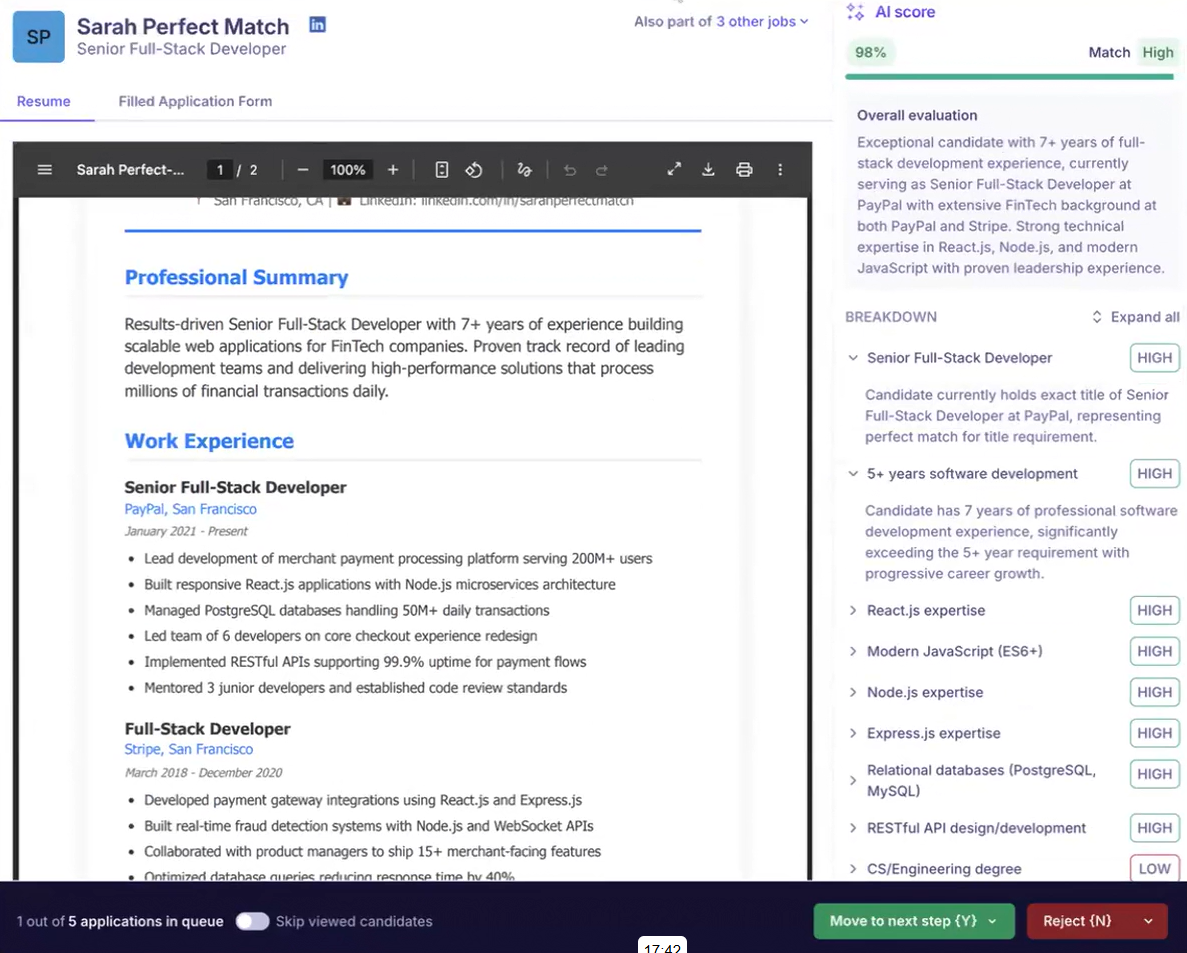
As soon as the platform detects a candidate who meets preset screening criteria, it can move them into a phone screening or video interview without any action needed from you.
This also ensures qualified applicants don't slip through the cracks.
You can now focus on more strategic hiring tasks than basic application reviews.
2. Use killer knockout questions for finding quality candidates faster
With AI screening, finding top talent becomes much easier. Recruiters have to add skills and criteria to the system, and applications will be filtered accordingly to get you qualified candidates.
Adding 2 to 3 knockout questions in the application helps this further. They work best for high-volume roles with clear minimum requirements.
A good rule of thumb is to keep these questions specific, so the answers are really helpful for identifying quality candidates.
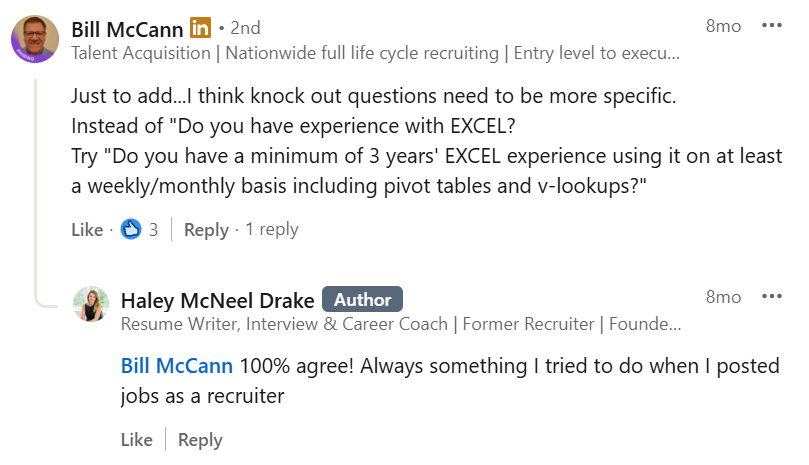
Focus on crafting these knockout questions around must-haves such as minimum required qualifications and legal work authorization.
When adding knockout questions to an application, recruiters have to include a disqualifying answer that automatically disqualifies candidates and makes the screening more efficient.
This helps eliminate irrelevant applications early and significantly reduces manual screening effort.
Candidate Sourcing & Attraction
3. Automatic job ad creation and posting
There are generally three elements to posting a job:
- The actual job post
- The career page for candidates to apply
- The platforms on which you choose to advertise the job opening
Automating JD and career page creation helps speed up the hiring process. Modern ATS tools offer Generative AI for writing effective job descriptions and customizable career page templates for hiring teams.

For JD, make sure to add this to the prompt:
- Remove gender-biased words
- Short introduction to the role and purpose
- Use simple industry titles
- Include salary and compensations
- Format it in bullet points
With automation, recruiters can instantly distribute job postings across platforms like Indeed, Google Jobs, Glassdoor, and more in a single click, without additional effort or cost.
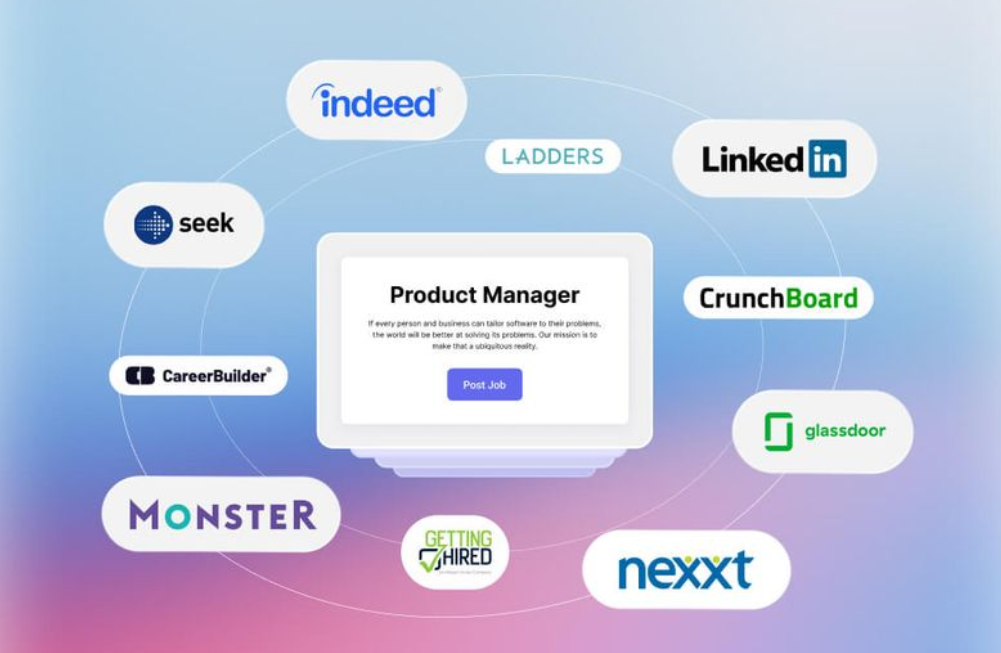
This not only saves time but also improves visibility and helps reduce time to hire.
4. Automate outreach and communications
With manual outreach, recruiters first spend time searching for relevant candidate profiles across databases and platforms and then reach out individually through emails or messages.
Automating this process helps recruiters identify relevant candidates from built-in databases and sourcing platforms and then engage them with personalized outreach messages automatically.
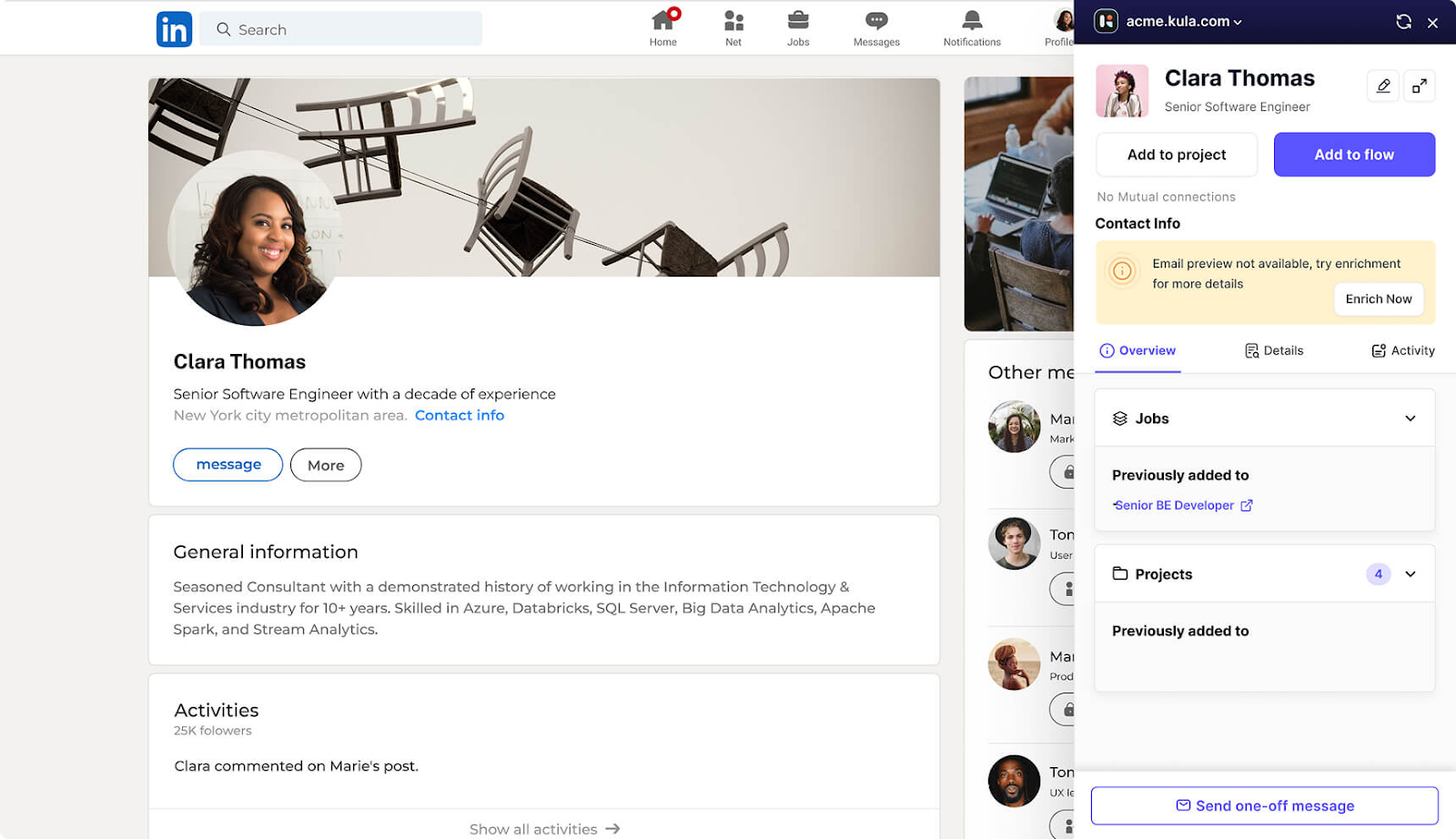
Recruiters can set up workflows for initial outreach, follow-ups, interview invites, reminders, and status updates based on candidate actions and hiring stages.
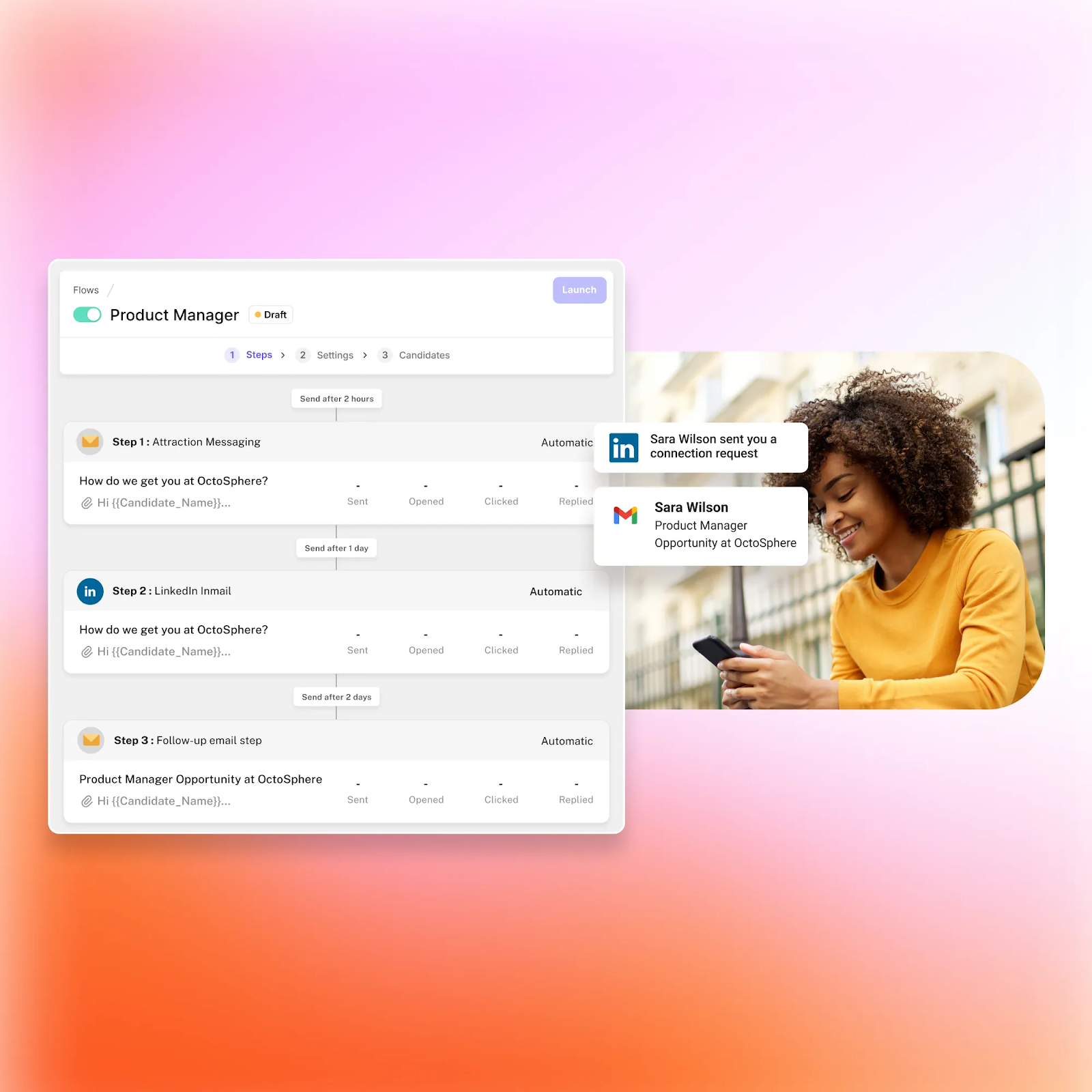
This not only saves time but also ensures consistent communication and improves candidate experience by keeping candidates engaged throughout the hiring process.
Interview Coordination & Scheduling
5. Enable candidates to self-schedule and automate calendar syncing
Emailing back and forth to find times that work for all parties is exhausting, especially when you have to coordinate with the candidate and a third party.
This is the reason why interview scheduling and rescheduling were the top contributors to increased time to hire last year. Recruiters spend 35% of their time on interview scheduling.
Self-scheduling automation is the solution to this low-value repetitive task. It allows candidates to sign up directly for open interview slots themselves without any assistance from your team.
When you invite candidates to interview, they receive a link to a real-time calendar showing pre-set available times that you configured. They can select an open slot, like an online appointment booking system.
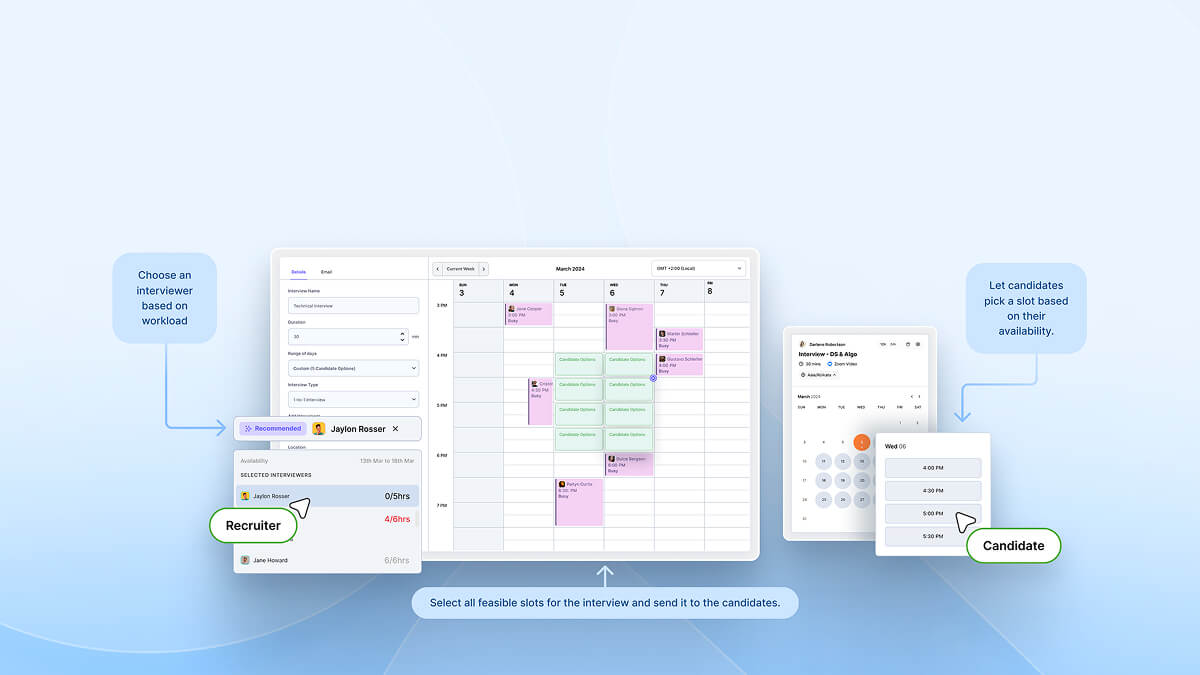
This self-service scheduling streamlines the complex back-and-forth of email tags.
Also, sync the calendar automatically to avoid any availability conflicts without getting the recruiters actually involved.
Even if candidates self-schedule from open slots, the system ensures not to double-book interviewers. And any last-minute meetings staff adds get reflected to prevent overlaps.
For example, if a recruiter is scheduling a coding interview with two engineering managers, Kula ATS would:
- Sync both managers’ calendars automatically
- Show the recruiter the common openings that are jointly available to those two
- Allow booking an available slot directly, factoring in existing meetings
- Add the interview to both calendars automatically
6. Automate interview and feedback reminders
Scheduling interviews is one thing, but ensuring all parties attend is another matter. Overloaded hiring managers who have back-to-back meetings often get their timings mixed up.
To help with this, automation can send timely interview reminders. By automatically sending templatized reminders through candidates' preferred communication channels leading up to the interview, attendance rates improve.
With Kula ATS, rules can be set up to:
- Send confirmation emails to candidates when meetings get booked
- Trigger reminder emails to candidates 24 hours before scheduled times
- Notify internal recruiters and interviewers one day ahead
Also, with an interview intelligence toolkit, hiring managers can improve and speed up the interview feedback process.
Overwhelmed hiring managers can access automated interview summaries and transcripts and create contextually accurate feedback for better candidate experience.
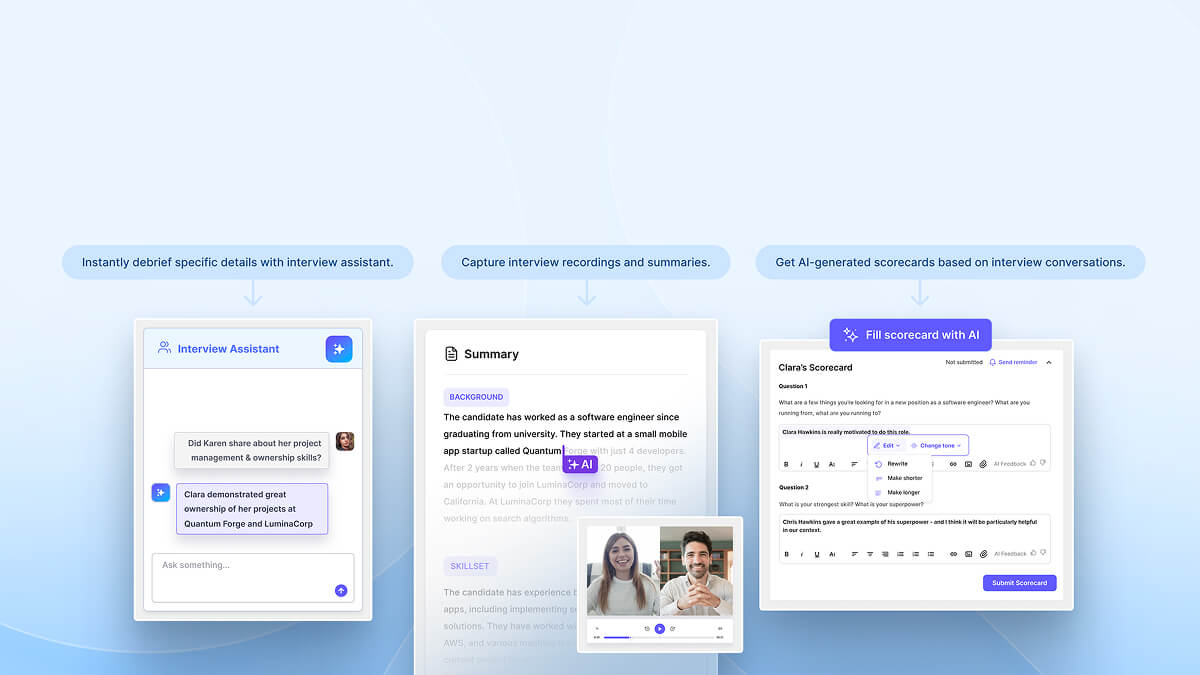
This is how the reminders would work:
- Send an automated debrief request to interviewers asking for feedback within 24 hours
- If no response after one day, auto-nudge stakeholders to submit comments
- Escalate an alert to the recruiting team if feedback is still not received after 48 hours
Workflow Automation & Team Collaboration
7. Assign tasks and delegate responsibilities
Tracking hiring tasks manually is a recipe for inefficiency. Assigning tasks with due dates is a step up, but the real win is automating the assignment process itself.
Customizable rules can trigger automated alerts and assign steps to relevant staff for any hiring stage. For example:
- When candidates reach the screening stage > Assign screening tasks to recruiters
- When references are submitted > Assign reference check to coordinator
- When the offer is signed > Assign paperwork collection to the HR associate
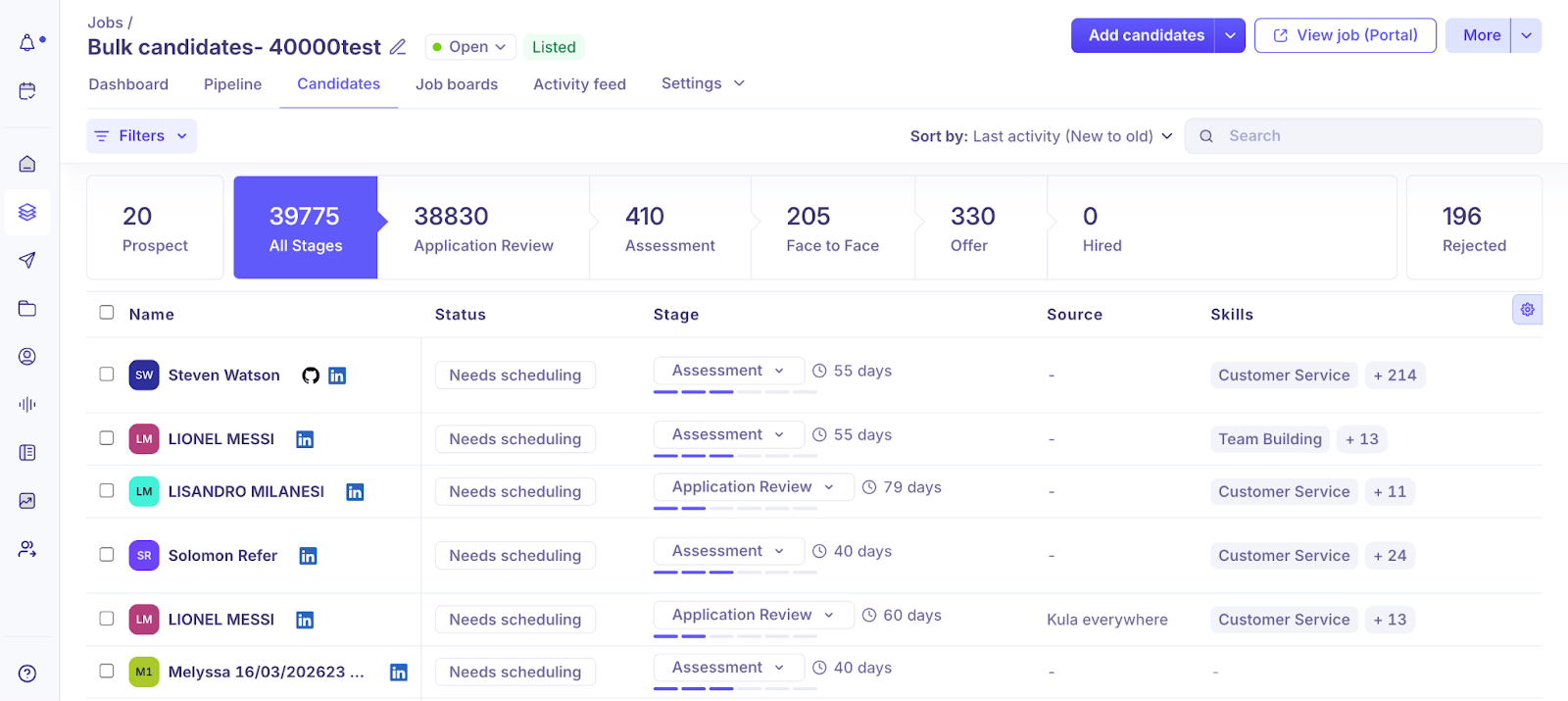
Rather than manually inspecting checklists, the Kula ATS proactively pushes progress notifications and reminders based on configured rules. This keeps everyone accountable without constant checking up.
This would ensure that:
- Tasks consistently assigned to the right people
- Due dates and notifications prevent dropping balls
- Transparency into real-time progress for all users
Candidate Experience & Onboarding
8. Send out candidate communications automatically
Once a candidate accepts an offer, getting them accurately onboarded with paperwork, company policies, and logins can bog down your teams. However, automation rules can trigger the necessary onboarding communications.
For example, when an accepted offer is logged in the system, it can automatically:
- Email personalized offer letters with details requiring signatures
- Email links to HR paperwork that must be completed
- Email employee handbooks, workplace regulations, etc
- Email IT credentials setting up corporate logins/email
- Schedule calendar invites for orientation sessions
Additional templated emails can also be sent leading up to start dates with first-week prep materials, recommended reading, introductions to key contacts, and more.
Automating these administrative candidate communications leads to a more polished welcome for the incoming team member.
Reporting & Analytics
9. Automate metrics tracking and reporting
With manual tracking, recruiters have to pull data from different tools, update spreadsheets, and calculate hiring metrics like time-to-hire, source performance, and conversion rates.
This process is time-consuming and prone to errors.
Modern ATS tools help recruiters set up dashboards and automated reports to track KPIs such as time-to-fill, interview-to-offer ratio, and candidate drop-off rates across different stages.
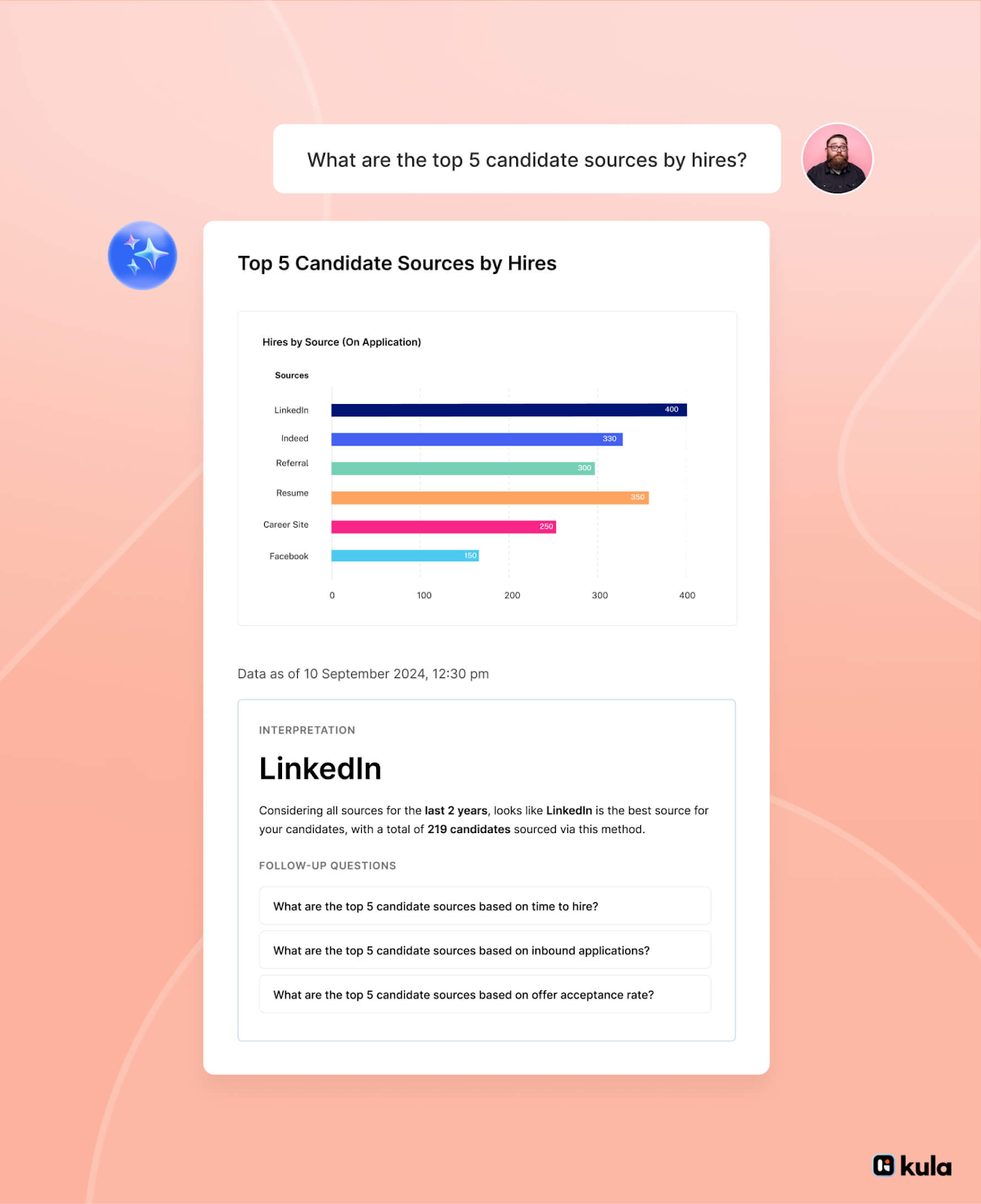
This not only saves time but also enables data-driven decision-making by providing accurate insights into what’s working and where the hiring process needs improvement.
Some of the best practices while automating metrics tracking for greater impact:
- Focus only on high-impact metrics like time-to-hire, conversion rates, and source performance. Avoid vanity metrics that add noise but don’t drive outcomes.
- Always break metrics down to identify bottlenecks. It’s not enough to know hiring is slow, you need to see exactly where it’s slowing down, whether it’s screening, scheduling, or offer stages.
- Keep reports real-time and actionable. Delayed or static reports lead to missed opportunities and slower decisions.
- Most importantly, every report should lead to a clear next step. If a metric changes, it should trigger an action, fix a stage, improve a source, or remove a delay.
Recommended read:
21+ recruiting report templates that drive better hiring decisions
What not to automate in hiring process
While automation can significantly improve efficiency, not every part of hiring should be automated. Some stages require human judgment, context, and empathy.
Final hiring decisions should always remain human-led. While AI can assist with insights and recommendations, selecting the right candidate requires a deeper understanding of team fit, potential, and long-term impact.
Candidate relationship moments should not be automated. Conversations during interviews, feedback discussions, and critical touchpoints shape the overall candidate experience and employer brand.
Offer discussions and negotiations also need a human approach. These conversations often involve expectations, concerns, and personalization that automation cannot handle effectively.
The goal is not to automate everything, but to use automation where it adds value and keep human involvement where it matters most.
Best practices for effective recruitment automation
1. Prioritize must-have integrations over nice-to-haves
Not all integrations add equal value. Many teams over-invest in tools that look good but don’t improve core workflows. Focus first on integrations that directly impact hiring operations, such as:
Must-have integrations:
- HRIS (core employee data)
- Calendar tools (Google Calendar, Outlook)
- Email and communication tools
- Job boards and sourcing platforms
Nice-to-haves:
- Additional analytics tools
- Niche plugins that don’t impact core workflows
HRIS integration is especially critical because it connects hiring data with employee data post-hire. Without it, teams end up duplicating work, creating data silos, and losing visibility across the employee lifecycle.
2. Watch for hidden costs of poor integration
Automation can create inefficiencies if tools don’t integrate properly. What looks efficient on the surface often leads to hidden costs behind the scenes.
These include:
- Manual data entry across multiple tools
- Duplicate or inconsistent candidate records
- Time spent fixing reporting discrepancies
- Lost context during tool handoffs
For example, if your sourcing tool doesn’t sync with your ATS, recruiters may end up re-uploading candidates manually. Instead of saving time, this adds friction. Regularly audit your workflows to identify where data breaks or gets duplicated, and eliminate those gaps.
3. Define KPIs before automating anything
Automation without clear goals leads to wasted effort. Before implementing any workflow, define what success looks like.
Focus on core KPIs such as:
- Time-to-hire
- Time-to-fill
- Conversion rates
- Candidate drop-off rates
- Offer acceptance rates
Automation should directly improve these metrics.
Also, avoid looking at metrics only at a high level, break them down by role, stage, or source to get actionable insights. This helps you understand exactly where automation is creating impact.
4. Standardize data, measure impact, and continuously improve
Start by standardizing how data is captured across your hiring process: define consistent stage names, use uniform tags, and ensure key fields are always filled. This creates a strong foundation for accurate reporting.
Once your data is structured, focus on measuring real impact. Automation should not just save time, it should improve hiring outcomes. Track key metrics like:
- Time-to-hire
- Conversion rates across stages
- Candidate drop-offs
- Offer acceptance rates
Compare these metrics before and after automation to understand what’s actually improving.
Finally, continuously refine your workflows based on real usage. Recruiters and hiring managers often face challenges that data alone doesn’t reveal, such as delays in feedback or inefficient workflows. Regular feedback helps identify these gaps and improve adoption.
5. Understand AI limitations and apply guardrails
AI can improve efficiency, but it has limitations. It may introduce bias, rely too heavily on keywords, or miss high-potential candidates who don’t fit predefined criteria.
To use AI effectively:
- Treat it as an assistive tool, not a decision-maker
- Regularly audit outputs to check for bias or gaps
- Combine AI insights with human evaluation
- Avoid overly rigid screening criteria
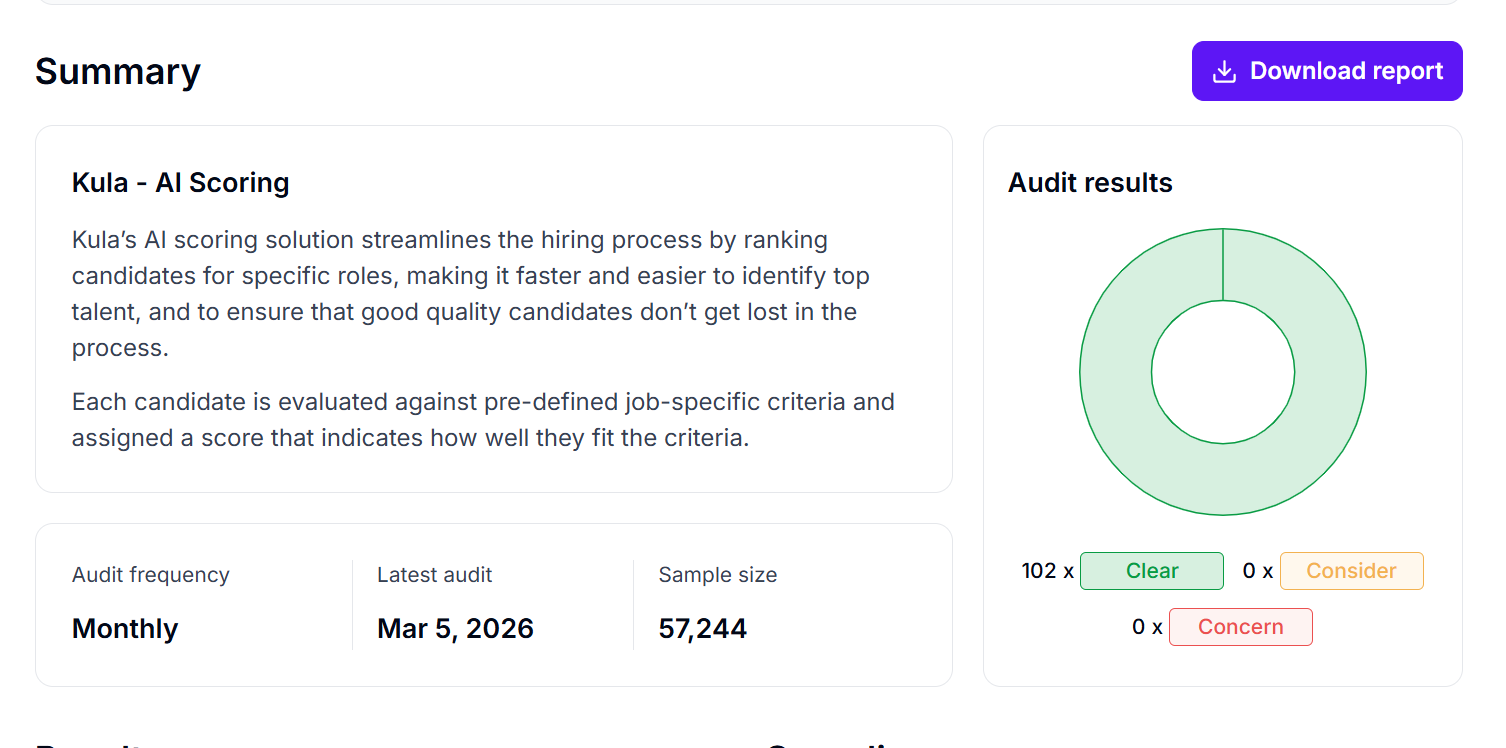
This ensures that automation improves hiring quality without compromising fairness or missing strong candidates
Automate the busywork with Kula’s ATS
Automation delivers major advantages across sourcing, screening, scheduling, interviewing, and onboarding. The key is to identify administrative bottlenecks and configure rules and triggers to eliminate repetitive tasks.
This provides visibility into pipelines, keeps candidates engaged, and advances processes, helping scale your talent strategy quickly.
As outlined in these examples, Kula ATS can be the most suitable end-to-end tool that makes your recruitment automation accessible.
Want to learn more about Kula’s benefits?