


Many recruiting teams stay on ATS systems they’ve already outgrown because they’re worried about losing years of candidate data or disrupting their team’s productivity.
However, ATS migration is far less risky or complex as they’re often made out to be.
Some teams describe the process as surprisingly smooth, while others face delays, unexpected costs, and data problems. The difference usually comes down to preparation and the support provided by the vendor.
In this article, learn what exactly makes the difference, where teams run into trouble, and how to move systems without losing any data.
Why ATS migrations fail: the four real culprits
Culprit 1: The vendor leaves the data work to you.
Some vendors position self-service migration as flexibility, but for recruiting teams, it often means taking ownership of a technical project they are not equipped to run.
When teams manually handle data migration, they must extract, clean, and format the data.
Many teams do it to save costs:
“To save on expenses, I opted to migrate all 5,600 candidates from our previous ATS myself. While this required a significant amount of time, I appreciated having the option to handle the migration independently, which saved us a considerable amount of money.”
But when your team isn’t prepared, and this expectation is not set up front, it blows timelines and budgets.
It causes:
- Unexpected workload
- Additional consulting costs
- Delayed go-live dates
- Data quality issues and missing records
✅Choose a vendor that provides hands-on migration support and clearly defines responsibilities before the project begins.
Culprit 2: IT configuration is treated as an afterthought.
IT owns the systems ATSs depend on: SSO, calendars, email, HRIS, and security controls.
When IT is not looped in early, it becomes a blocker mid-migration.
For example, A company completes its ATS migration and plans to go live on Monday, only to discover that SSO and calendar integrations were never configured. Recruiters cannot log in, hiring managers stop receiving interview invites, and the launch is delayed while IT scrambles to complete the setup.
✅Instead, involve IT early in the migration process and complete critical configurations.
Culprit 3: Pipelines and stages are not configured before data import.
Importing candidates into a system with undefined pipeline stages means candidates land in the wrong place and have to be manually moved. This creates confusion and erodes trust in the new system in its first days.
For example, imagine importing 3,000 candidates into a new ATS before pipeline stages are defined. Candidates who were in final interviews may appear in screening stages, while rejected candidates may look active. Recruiters then spend days manually correcting records.
✅The operational tip from the research is direct: configure your pipeline stages before data import, not after.
Culprit 4: Trying to migrate everything.
Many teams try to migrate every record from their old ATS, but not all data is worth keeping.
Outdated candidate profiles, prospects who never responded, duplicate records, and low-value activity logs such as "left voicemail" or "sent follow-up email" often add clutter without providing meaningful recruiting insights.
✅Instead, prioritize high-value data like active candidates, live jobs, placement history, candidate notes, and recent recruiting activity that teams actually use.
What a well-run ATS migration timeline looks like
Most straightforward ATS-to-ATS switches for mid-market teams should land in three to six weeks.
For example, standard Greenhouse and Lever (legacy ATS) implementations take about six weeks when the team is prepared, and the vendor provides a project plan.
On the other hand, modern platforms are significantly faster. Some Ashby implementations are completed in two to four weeks, while several Kula migrations were live in under three weeks, including admin and recruiter training.
Workday integrations are a category of their own. One company was quoted a minimum of 16 weeks for a Workday integration with a major ATS vendor, while another vendor completed the same integration in seven weeks. The variance is entirely vendor-dependent, not inherent to the complexity.
Regardless of the platform, most ATS migrations follow the same six-phase implementation process.
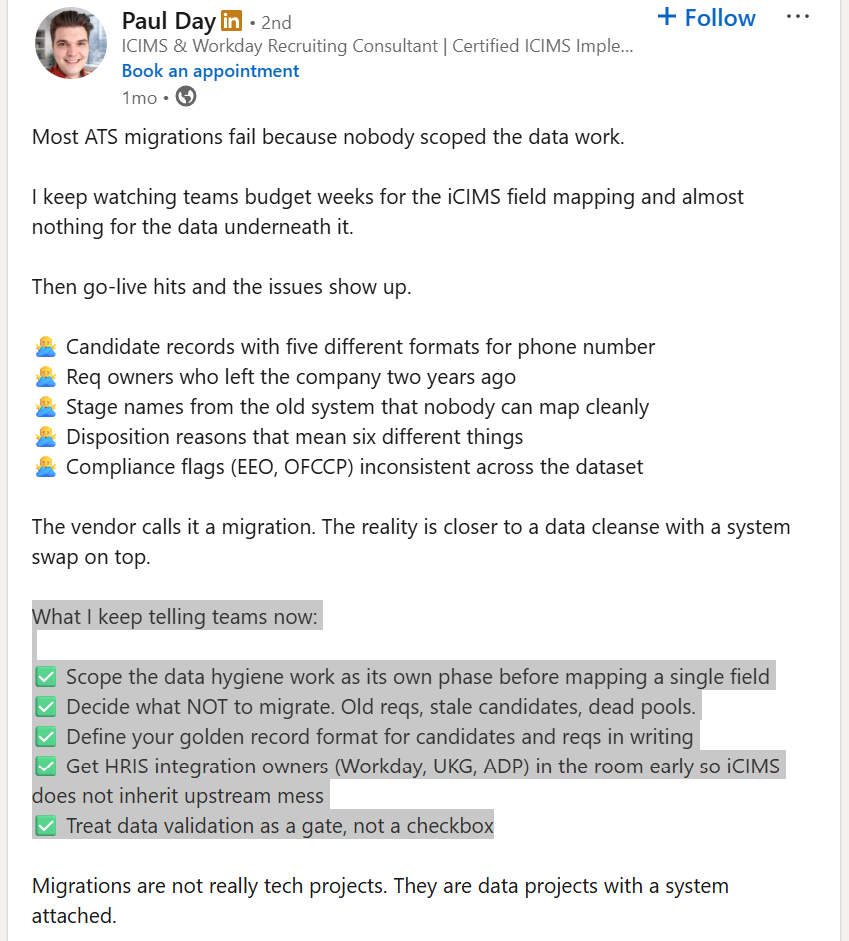
Phase 1: Audit and clean your current data
Evaluate your data, data fields, and workflows. Review what is in use and remove any duplicate information, old candidate records, empty fields, inconsistent formats, and outdated job records. Cleaning data helps with faster migration.
Phase 2: Export and map your data
Choose the format for data export: CSV or XML, and export candidate records, jobs, templates, workflows, and custom fields. Include all templates in use, such as email, job description, follow-ups, and more.
Then map them to their equivalents in the new ATS. This is especially important for custom fields, tags, and hiring stages that may not have direct equivalents.
Further, group fields to add more structure to your data. For example, candidate information will include (Name, Email, Phone).
Phase 3: System configuration
Set up pipelines, stages, permissions, workflows, integrations, SSO, DNS, and HRIS connections. Involve the IT handler, if needed, but make sure to set up the system.
Phase 4: Test migration
Run a pilot test first, before importing the entire clean dataset. Import a sample dataset to verify field mapping, data accuracy, and workflows. Resolve any issues at the sample level.
Phase 5: Parallel running phase
This is one of the most underrated steps that teams should not skip. Run both systems simultaneously for two (for small teams) to three weeks (for larger teams). This allows recruiters to continue hiring while validating that the new ATS works as expected.
Phase 6: Team training
Choose role-based training over product walkthroughs. Build sessions around actual daily workflows, not feature lists.
Three variables determine where you land:
- First, how prepared your data is going in—clean, tagged candidate records migrate faster than unstructured archives.
- Second, how responsive your IT team is to configuration requests.
- Third, how good your vendor's implementation team is. That last one is the highest-leverage variable of the three.
What to Migrate, What to Leave Behind, and How to Protect Your Data
The goal of an ATS migration is to move the right data. Teams that try to preserve everything often create clutter in the new system.
What to migrate:
Clean structured candidate data, such as candidate profiles, contact information, application history, interview notes, hiring stage data, offer history, job requisition records, and both standard and custom fields.
Structured data is the safest data to migrate because it can be mapped consistently between systems.
What is at risk:
Any inconsistent data, such as:
- Custom fields that do not have a direct equivalent in the new system.
- Attachment formats that differ between platforms.
- Historical pipeline stage names that do not map cleanly to the new system's stages.
For example, a custom "Silver Medalist" field may disappear entirely if the new ATS does not have an equivalent field and no mapping is created.
What to leave behind:
Not every record deserves a place in the new ATS. Outdated candidate profiles, old sourcing records, unresponsive prospects, obsolete contact information, and low-value activity logs such as "left voicemail" or "sent follow-up email" are of no value. Also, duplicate records created by years of inconsistent data entry create database bloat.
The non-standard migration:
Not every migration is ATS-to-ATS. Some teams are moving off spreadsheets, CSVs, and shared drives. This is more complex because there is no structured export, but it is solvable.
One team described their migration: "I just had a bunch of candidate files and some CSVs. The team did an incredible job of getting that into the system. It wasn't your normal ATS-to-ATS transition, and they made it easy." What made it work was a vendor who treated it as a custom project, not a standard process.
In these cases, success depends on data cleanup, field mapping, and migration expertise rather than automation alone. Teams should look for vendors that offer hands-on migration support and are willing to adapt their process to non-standard data sources.
What to demand from your vendor:
- A pre-migration data audit.
- Written confirmation of which fields will and will not migrate.
- A deduplication pass before import.
- A named person responsible for data integrity.
If the vendor cannot provide all four of these, that is a signal about the quality of their implementation support.
The pre-migration checklist: Five things to verify before signing an ATS contract
1. Audit your current data and setup before you start.
You cannot estimate migration effort until you know what you're moving.
Audit your old ATS data to know what is worth migrating and what is not.
- How many active candidate profiles are there?
- What workflows and features are of use?
- What data fields are important to your team?
Focus on retaining high-value records such as active job profiles, active requisitions, interview notes of hired candidates and silver medalists, and offer history.
At the same time, remove duplicated candidate records, low-value activity logs, and outdated candidate profiles and sourcing history.
A migration is an opportunity to improve data quality, not just transfer data. The cleaner your data is before migration, the faster the implementation and the more reliable your new ATS will be from day one.
In short:
High-value data to migrate
- Candidate notes
- Candidate interactions
- Outreach history
- Job candidates were pitched for
- Hiring manager information
- Placements
- Client contacts
- Activity history related to active relationships
Lower-value data to eliminate
- Candidate profiles untouched for years
- Old sourcing records
- People who never responded
- Outdated contact information
2. Define your pipeline stages before migration day.
The new system should be configured with your stage names, approval workflows, and hiring manager permissions before a single candidate record is imported. Candidates should land in the right place from day one.
Every stage in the old ATS should have a clear equivalent in the new system, including custom stages and status labels. If stages are not mapped properly, candidate statuses can become inaccurate after import, forcing recruiters to manually correct records and creating confusion about where candidates are in the hiring process.
Ask the vendor how pipeline stages and custom workflows will be mapped before migration begins.
A properly configured pipeline ensures data remains accurate and recruiters can start using the new ATS immediately after go-live.
3. Loop IT in at contract signing, not at go-live.
Every team that experienced IT-related delays got there by looping IT in late.
Critical migration tasks such as DNS configuration for email deliverability, SSO setup, HRIS field mapping, and user access provisioning all require IT involvement. If these dependencies are discovered near go-live, implementation timelines can quickly slip.
Bring IT into the project as soon as the contract is signed and include them in implementation planning before the vendor kickoff call.
4. Get a named implementation contact in writing.
Not a support queue. A person.
Teams that had successful ATS migrations consistently cited their implementation manager as the factor that made the difference. A dedicated implementation manager coordinates stakeholders, resolves blockers, keeps timelines on track, and serves as a single point of accountability throughout the project.
As one customer put it:
"The implementation was the most well-organized HR tech implementation I have been a part of. Our implementation manager was the best I have ever worked with in the industry." Ask for this specifically during the sales process.
Ask who will own your implementation before signing the contract. If the vendor cannot clearly identify that person, treat it as a warning sign.
5. Ask for a project plan with named milestones and owner accountability.
The vendors that deliver on time typically follow a written implementation plan with clear milestones, deadlines, and ownership.
A good project plan should outline key stages such as data export, field mapping, IT configuration, testing, training, and go-live. It should also identify which stakeholders are responsible for each step and when their involvement is required.
Without a documented plan, responsibilities become unclear, dependencies get missed, and migration timelines can quickly slip.
Ask to see a sample implementation plan during the sales process. If a vendor cannot provide one, treat it as a warning sign.
How to keep recruiting moving during an ATS migration
What "no downtime" actually requires
Zero downtime does not happen automatically. The teams that achieved it planned for it.
Successful ATS migrations include running the old and new systems in parallel for a defined period, typically one to two weeks, so active requisitions do not fall into a gap.
Recruiters should be trained before they go live, and not after it. Hiring managers should know what is changing, when it is changing, and what they need to do differently.
As one team put it, “most employees didn't even realize we made the switch until they were completing their scorecards."
Don't delay ATS adoption by waiting for migration completion
Don't make the data migration the reason why the team is not going live.
There's always going to be some kind of gap in data because recruiters continue creating records in the old ATS while the migration is in progress.
User adoption and familiarity with the new system matter more than achieving a flawless migration.
Training scope for modern platforms
Modern ATS platforms are designed for recruiter-led onboarding, not IT-led implementations. Recruiters should be able to learn the system quickly without extensive training programs.
The training timelines for modern ATS such as Kula and Ashby are described in days, not weeks.
One team completed structured admin and recruiter training as part of a three-week migration and was fully operational immediately after go-live.
If a vendor is telling you training will take more than two weeks for a mid-market team, ask why.
Long training timelines may indicate workflow complexity, poor usability, or an implementation process that relies too heavily on formal instruction.
Give your team a little data entry exercise to train them
Vivien Maron, talking about team training during ATS implementation, says:
"The best life hack that I have for that is to have the system set up as quickly as possible. Get the team in, book off a Friday, do like a pizza party, have everybody block off like 2 to 4 hours, and just add the critical data, add the searches, add the people."
Low adoption often happens because users don't know how to use the ATS. But just by having them enter the data, it teaches them the basics. It gets them familiar. They'll know what to do.
Internal training and practical usage improve adoption.
The hiring manager experience:
Hiring managers are occasional ATS users, not system experts. They do not need full training.
They need one session covering how to view their pipeline, submit interview feedback, and get notifications. If the system requires more than that for basic hiring manager participation, the UX is the problem, not the training.
The moment you know it worked:
The best migrations are invisible to most of the organization. The recruiter knows the system has changed. The hiring manager notices it feels easier. Everyone else finds out when they go to fill out a scorecard and discover it is in a new place. That is the target outcome.
The vendor questions that separate good implementations from bad ones
Six questions to ask every ATS vendor before signing.
- Who is my named implementation contact, and what is their capacity across other implementations right now?
- What does your standard data migration include, and what falls to us?
- What is the documented timeline for our specific setup, including any HRIS integrations?
- Can you share a project plan template from a comparable migration?
- What happens to active requisitions and in-progress candidates during the transition period?
- What is your policy if the migration runs over the agreed timeline?
Strong vendors answer these questions with clear documentation and defined ownership. Weak vendors rely on vague timelines and verbal assurances.
The answers to these questions will tell you more about implementation quality than any feature comparison or pricing negotiation.
Final thoughts
Many migration problems are actually data-entry problems that existed long before migration started.
Take ATS migrations as an opportunity to review data quality and remove inconsistent and irrelevant data to speed up the implementation process.
Just as importantly, the biggest implementation risk may not be data loss. It may be poor user adoption. Focus on training recruiters with a quick exercise session and role-based training, rather than feature-based.
Kula has recently helped a recruiting team migrate from Lever in just under 3 weeks, with structured admin and recruiter training sessions. Our team provides quick responses, a structured approach, and clear timelines for quick implementation.
If you're planning an ATS migration and want to understand what the process would look like for your team, book a demo with Kula.